Chord Progression
v1.0.0Ableton Live 12 extension (Extensions SDK): generate diatonic chord progressions as MIDI clips from Live's current scale
 Cesar
CesarChord Progression
An Ableton Live 12 extension (built on the new
Extensions SDK, 1.0.0-beta.0) that generates diatonic chord progressions
as MIDI clips. Right‑click an empty Session slot, dial in the feel, preview it in
the browser, and write it straight into Live.
The progression is built from Live's current scale — set the root and scale in Live and the chords follow automatically.
Beta software. The Extensions SDK is not published to npm and requires the Ableton Live 12 beta with Developer Mode enabled.
Features
- Reads Live's scale. Root note, scale name, scale intervals and tempo come
from the current Live Set (
song.rootNote,song.scaleIntervals, …). No key picker to keep in sync. - Diatonic progressions with a one‑click Variation that cycles musical
templates (the default
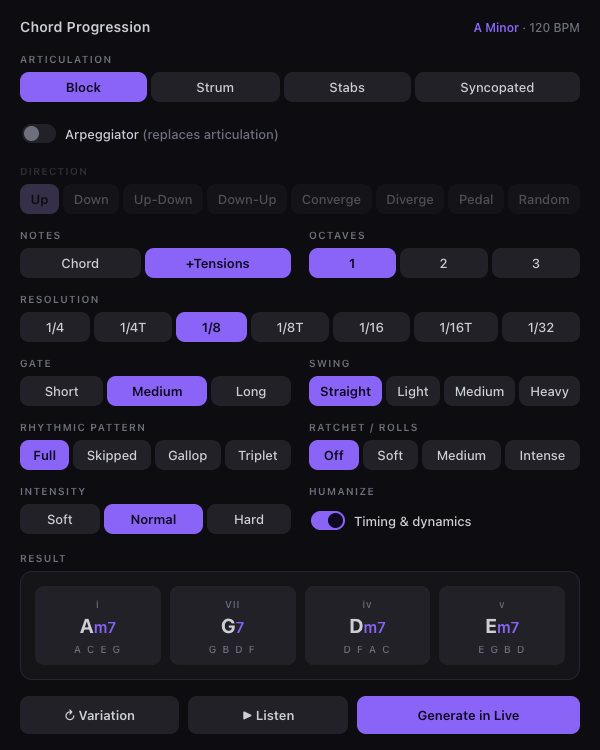
i–VII–iv–vmatches the reference design) and a random diatonic mode. - Articulation: Block, Strum, Stabs, Syncopated.
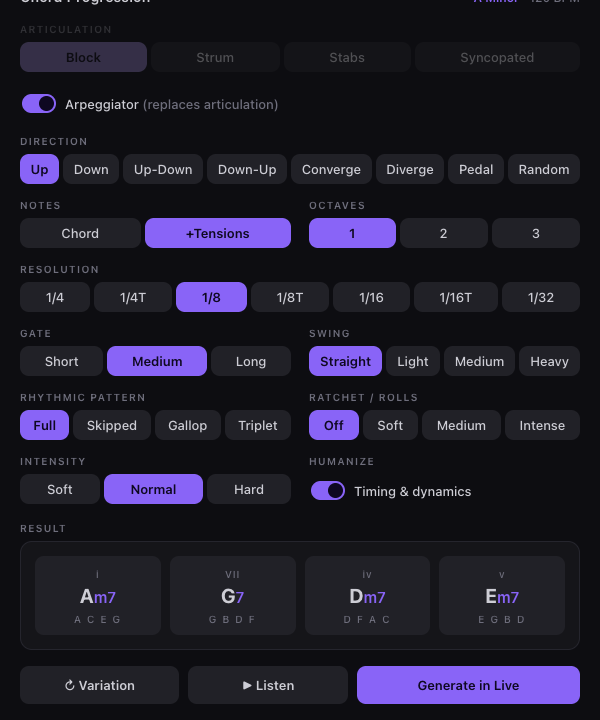
- Arpeggiator (replaces articulation when on) with eight directions: Up, Down, Up‑Down, Down‑Up, Converge, Diverge, Pedal, Random.
- Voicing: triad (
Chord) or seventh (+Tensions), spread over 1–3 octaves. - Rhythm: resolution grid (
1/4 … 1/32, including triplets), a Rhythmic Pattern groove (Full, Skipped, Gallop, Triplet/tresillo), Gate length, and Swing on off‑beats. - Ratchet / Rolls: Off, Soft, Medium, Intense — subdivides fired steps into rapid repeats.
- Dynamics: Intensity (velocity) and a Humanize toggle that jitters timing
and velocity (and sets
velocityDeviationon each note). - In‑browser preview ("Listen") via the Web Audio API — audition before you commit, without touching Live's audio engine.
- Generate in Live writes a MIDI clip into the right‑clicked slot, replacing any existing clip, and names it after the key + roman numerals.
Arpeggiator mode (Direction active, Articulation dimmed):
How it works
ClipSlot right‑click
        │  context menu action
        ▼
extension.ts ──reads──► song.rootNote / scaleIntervals / tempo
        │  injects a LiveContext snapshot into the dialog HTML
        ▼
interface.html (modal webview)
        │  builds chords, renders the panel, previews via Web Audio
        │  user clicks "Generate in Live"
        ▼  postMessage { notes, lengthBeats, clipName }
extension.ts ──► clipSlot.createMidiClip(length); clip.notes = notes
- The host (
src/extension.ts) registers the context‑menu command, snapshots Live's musical context, opens the modal withcontext.ui.showModalDialog(dataUrl, w, h), and writes the returned notes. - The UI (
src/interface.html) is a self‑contained webview. All music logic (chord building, note generation, naming) lives here so the preview and the written clip are guaranteed to match. It receives Live's context through a single__LIVE_DATA__token the host replaces before opening the dialog, and returns its result with the host bridge ({ method: "close_and_send", params: [json] }).
Note model
Generated notes are plain NoteDescription objects:
| Field | Driven by |
|---|---|
pitch | scale degree + voicing + octaves |
startTime | resolution grid + swing + humanize jitter |
duration | gate fraction of the step / bar |
velocity | intensity (± humanize) |
velocityDeviation | set when Humanize is on |
One chord spans one 4/4 bar; a 4‑chord progression is a 16‑beat clip.
Project layout
chord-progression/
├── manifest.json        # extension metadata (name, entry, API version)
├── package.json         # scripts + SDK/CLI deps (from the local .tgz files)
├── build.ts             # esbuild bundle (inlines .html as text)
├── tsconfig.json
├── .env.example         # copy to .env and set EXTENSION_HOST_PATH
└── src/
    ├── extension.ts     # host side: context menu + clip writing
    ├── interface.html   # webview UI + music engine + Web Audio preview
    └── html.d.ts        # lets TS import the .html as a string
Development
Requirements
-
Node.js
>= 24.14.1(the Extension Host runtime). Build tooling runs on older Node, but match the host version to be safe. -
Ableton Live 12 beta with Preferences → Extensions → Developer Mode enabled.
-
The SDK and CLI
.tgzfiles from the Ableton Extensions distribution. They are not included in this repo — the Extensions SDK is Ableton beta software distributed via Centercode and is not redistributable. Obtain them from Ableton, then either place this repo next to the two files:../ableton-extensions-sdk-1.0.0-beta.0.tgz../ableton-extensions-cli-1.0.0-beta.0.tgz
…or edit the
file:paths inpackage.jsonto point at wherever you keep them.
Setup
npm install
cp .env.example .env        # then edit EXTENSION_HOST_PATH for your machine
EXTENSION_HOST_PATH points at Ableton Live (the .app on macOS, the .exe on
Windows, an install root, or the ExtensionHostNodeModule.node file directly).
Run in Live
npm start # build:dev + extensions-cli run
With Developer Mode on, Live hands the Extension Host to the CLI. Right‑click an empty Session clip slot → Generate Chord Progression….
Other scripts
npm run build               # production bundle (minified)
npm run package             # build a distributable .ablx archive
Customising
- Progression templates — edit
PROGRESSIONSinsrc/interface.html(0‑based scale degrees). The first entry is the default; Variation cycles the list and ends on a random diatonic progression. - Feel constants —
RES_BEATS,GATE_FRAC,VELOCITY,SWING_AMT, andSYNC_MASKin the same file tune the rhythmic and dynamic ranges. - Bar length / chord count —
BEATS_PER_CHORDand the template length. - Arpeggiator orderings —
arpOrder()defines each Direction.
Possible next additions: chord tensions beyond the seventh (9/11/13), per‑step velocity accents, and custom time signatures.
License
This extension's source is released under the MIT License.
The Ableton Extensions SDK and CLI it depends on are not covered by this license and are not included in this repository — they are Ableton beta software with their own terms. Obtain them directly from Ableton.
Rate this extension
One rating per account; you can change it any time.
Comments
No comments yet.