Chord Reharmonizer
v1.0.0A context-menu extension for Ableton Live 12 that reharmonizes the chord progressions you've already got — right in your clips, without hand-editing MIDI.
 notacap
Chord Reharmonizer
A context-menu extension for Ableton Live 12 that reharmonizes the chord progressions you've already got — right in your clips, without hand-editing MIDI.
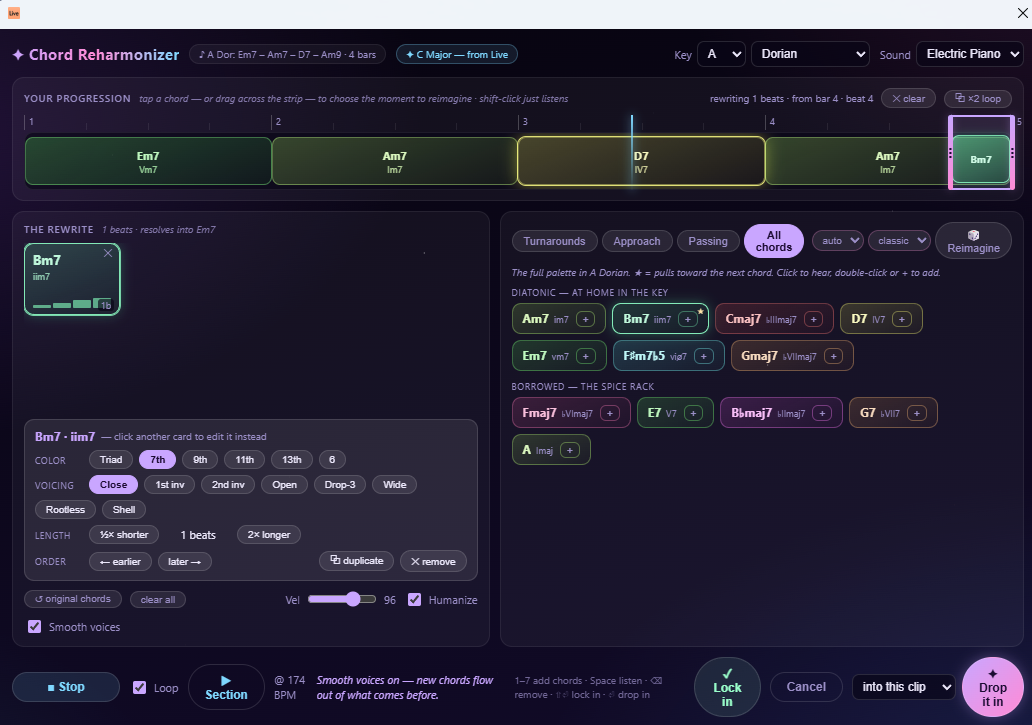
Right-click a MIDI clip → Reharmonize Section…, and a dialog reads the clip into chord blocks on a timeline. Select a section, then add a turnaround, chromatic approach chord, or passing chords — or place any chord in the key by hand — auditioning everything in context at your project tempo before you drop it in. Where Chord Progression Builder writes a new progression from scratch, Chord Reharmonizer transforms an existing one.
Features
- Reads your clip into chords. The extension analyzes the MIDI clip into chord blocks laid out on a bar/beat timeline, colored by a circle-of-fifths hue wheel so harmonically close chords get visually close colors.
- Opens in your key. It snapshots your Live Set's root + scale on open, so every suggestion is already in key. Override the key/mode at any time without losing your edits.
- Select any section — click a chord block (you hear its real notes) or drag across
the timeline. Shift-click a block to just audition it without touching the selection.
Edge handles and a draggable middle fine-tune the span, with a live
rewriting N beats · from bar Xreadout. - Context-aware reharmonization techniques — each reads the chord that follows your
selection and offers musically correct options:
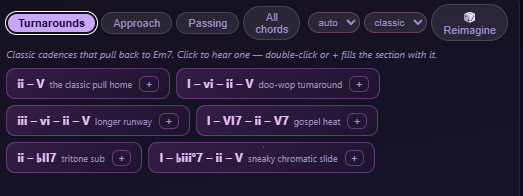
- Turnarounds — cadential templates that lead back to the next chord (
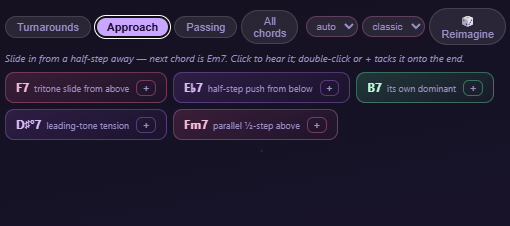
ii–V,I–vi–ii–V,iii–vi–ii–V, secondary-dominant, tritone-sub, and passing-diminished). - Approach — a chord placed right before the next one (tritone sub, half-step below, secondary dominant, leading-tone °7, parallel half-step).
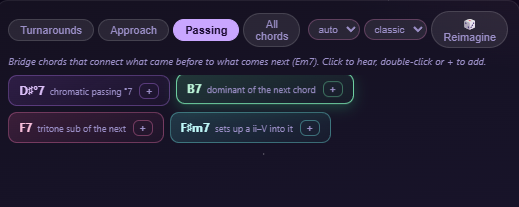
- Passing — a chord that bridges the preceding and following chords.
- All chords — every diatonic and borrowed chord in the key; the ones that pull toward the next chord are ★ starred.
- 🎲 Reimagine — rolls a progression that resolves into whatever follows the selection: chords are generated backward from the next chord (dominants, ii–Vs, tritone subs, leading-tone °7s, borrowed colors) and auto-played. Pick how many chords (auto / 1–6 — auto fits the selection length) and a vibe — subtle never leaves the key, classic adds secondary dominants and stock turnarounds, spicy raids the spice rack. 📌 Pin the cards you like and reroll: pinned chords survive untouched and rerolled ones keep their rhythm, so a roll converges instead of starting over.
- Turnarounds — cadential templates that lead back to the next chord (
- Audition before you commit. Suggestion chips play on a single click; a second click (or the + button) commits them. Tapping a timeline block, a rewrite card, or a palette chip plays it instantly.
- ▶ Listen plays the whole progression — your rewrite in context, original notes around it — tempo-synced with a sweeping playhead and a Loop toggle that picks up edits on the next pass. ▶ Section auditions just the rewrite and the chord it resolves into.
- Chord colors & voicings (CPB parity). Per-chord extensions (9ths, 13ths, sus, altered tensions) and voicings (Close, inversions, Open/drop-2, Drop-3, Wide, Rootless, Shell) — recomputed from the canonical chord so transforms never compound.
- Sits in the part. New chords are register-anchored to the original material's range instead of jumping to middle C. Optional Smooth voices voice-leads from the notes just before the selection, plus a Velocity slider and Humanize toggle.
- Multi-section editing. ✓ Lock in bakes the current section and frees the selection for the next one — reharmonize several spots in a single pass, with a 32-deep ↩ undo history.
- Write where you want. Apply into this clip (rewrites in place as one undo step,
works for session and arrangement clips) or as a new clip (
"<original> (reharm)"in the next empty session slot). Applying slices the original notes at the selection boundaries, so a chord ringing past the edge keeps its tail.
Screenshots
Your progression on a bar/beat timeline — click or drag to pick the section to reharmonize:

Context-aware technique tabs — each reads the chord that follows your selection:
| Turnarounds | Approach |
 |  |
| Passing chords | Every chord in the key (★ pulls to the next) |
 | 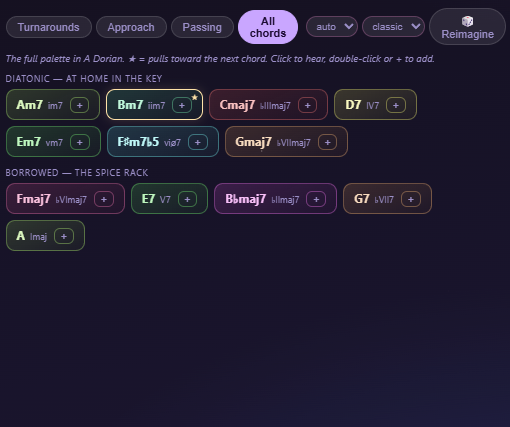 |
| Per-card color, voicing, length & order | Audition: ▶ Listen / Loop / ▶ Section |
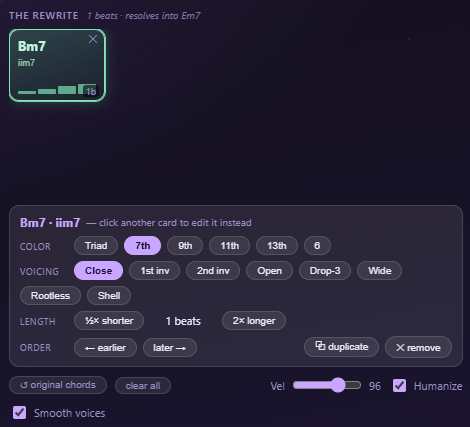 |  |
✓ Lock in the current section to commit it and keep reharmonizing more spots in the same pass — then drop the whole rewrite into the source clip or a new one:
Requirements
- Ableton Live Suite 12.4.5 or newer (Extensions require Live Suite).
Install
- Download
Chord-Reharmonizer-1.0.0.ablxfrom the Releases page. - In Live, open Preferences → Extensions.
- Drag the
.ablxfile into the Extensions list (or use the install button). - Right-click any MIDI clip and choose Reharmonize Section….
Note: Extensions are a Live Suite feature. The first time you install a community extension you may need to confirm the install in Live's dialog.
How to use
- Right-click a MIDI clip → Reharmonize Section….
- Select a section of the progression — click a chord block or drag across the timeline (shift-click a block to audition it without changing the selection).
- Add a turnaround / approach / passing chord from the technique tabs, place chords by hand from the key palette, or hit 🎲 Reimagine (set the chord count + vibe next to the dice, 📌 pin keepers between rolls). Single-click a chip to hear it, click again (or +) to commit.
- Shape each card's color, voicing, length, and order; toggle Smooth voices and Humanize; press ▶ Listen to audition at your project tempo.
- (Optional) ✓ Lock in the section and move on to another spot in the clip.
- Pick a destination and hit ✦ Drop it in — the rewrite lands in your clip.
Building from source
Requires Node ≥ 22.11.
npm install
npm run build       # type-check + production bundle
npm run package     # builds, then produces the distributable .ablx
npm run start       # build:dev + launch in Live (needs Live running + EXTENSION_HOST_PATH in .env)
How it works
The extension stays a thin reader/writer: it reads the clip + key once at open time and
applies the final rewrite once. All analysis, editing, and rendering happen client-side
in the dialog webview (which carries its own self-contained chord-detection and
close-voicing engine — no tonal in the browser), with no round-trips in between.
src/extension.ts— SDK activation, thetonal-based chord palette (diatonic + curated borrowed chords per mode), the clip/key snapshot, andwriteReharmonizedClip(in-place / new-clip apply). Registerscrh.openon theMidiClipcontext-menu scope.src/dialog.html— the entire UI and engine: clip→chord-block analysis, the timeline + selection state-machine, the ghost-preview renderer, the technique generators, register anchoring + auto voice-leading, the Web Audio instruments + loop transport, and the postMessage bridge.
Known limitations
- Assumes 4/4 — the SDK doesn't expose the clip's time signature, so the bar grid is fixed at 4 beats/bar.
- Chord-block detection is heuristic — tuned for root-position block chords; dense or arpeggiated clips may over-segment (the drag-select fallback covers those cases).
- Block-chord output — inserted chords are sustained blocks; they don't yet match the source clip's rhythm or per-chord velocity.
- "As a new clip" writes to a session slot — for arrangement clips, use the default in-place mode (which fully supports them).
Credits
Built by hello_nocap with the
@ableton-extensions/sdk and the
tonal music-theory library.
License
Released under the MIT License © 2026 hello_nocap.
Rate this extension
One rating per account; you can change it any time.
Comments
No comments yet.