Drum Rack Optimize Volume
v0.0.2One-click Ableton Live extension: set all Drum Rack Simpler pads to 0 dB and Vol<Vel 0%. Built with the Ableton Extensions SDK.
 Stevenashbeats
Drum Rack Optimize Volume
A tiny Ableton Live extension that resets every pad in a Drum Rack to a clean starting point in one click — built with the new Ableton Extensions SDK (beta).
Right-click a Drum Rack → Optimize Volume (0 dB · Vol<Vel 0%) and it instantly:
- sets every Simpler pad's Volume to 0 dB,
- sets Vol < Vel to 0% on all pads,
- all wrapped in one undo step (⌘Z to revert).
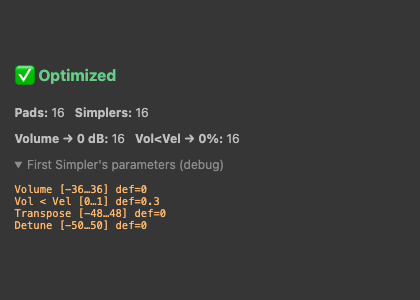
Great for consistent gain staging across a kit before you start mixing — no more pads randomly sitting at -12 dB or velocity ducking your hits. It also shows a quick summary of what it changed:
Requirements
- Ableton Live 12 build that supports Extensions (the Extensions SDK is currently in beta).
- Developer Mode enabled: Preferences → Extensions → Developer Mode.
Install (prebuilt)
- Download
Drum-Rack-Optimize-Volume-x.y.z.ablxfrom the Releases page. - In Live: Preferences → Extensions → Install Extension… → pick the
.ablx. - Activate it and restart Live.
- Right-click a Drum Rack → Optimize Volume (0 dB · Vol<Vel 0%).
Build from source
This project depends on the Ableton Extensions SDK packages (@ableton-extensions/sdk and
@ableton-extensions/cli), distributed by Ableton as a beta .tgz bundle — they are not included here.
- Get the Extensions SDK beta from Ableton and note the path to the extracted folder
(it contains
ableton-extensions-sdk-*.tgzandableton-extensions-cli-*.tgz). - Point the
file:paths inpackage.jsonat those.tgzfiles. - Install & build:
npm install npm run build # type-check + bundle to dist/ npm run package # production build + .ablx archive - Dev mode (loads straight into a running Live with Developer Mode on):
npm start
How it works
For each pad chain in the Drum Rack it finds the Simpler device and, via the SDK's DeviceParameter API:
- Volume →
0(Simpler's Volume is in dB, so0= 0 dB; falls back to the parameter default if the range isn't a dB range), - Vol < Vel → the bottom of its range (
0%).
All changes run inside a single withinTransaction(...) so it's one undo step.
Notes & limitations
- Works on Simpler-based pads. Sampler / Drum Cell aren't exposed as classes by the current SDK, so those pads are skipped (the result dialog reports this).
- The Extensions SDK is beta; APIs and behavior may change.
License
Rate this extension
One rating per account; you can change it any time.
Comments
No comments yet.