elevenlabs-ableton
v0.8.0Ableton Extension for ElevenLabs API
 EazyTom
Ableton Extension: elevenlabs-ableton
Bring ElevenLabs API integration into Ableton Live — text-to-speech dialogue, sound effects generation, music generation, voice transformation, transcription, stem separation, voice cloning, batch processing, and more — directly from Live context menus.
Current release: v0.8.0 · Changelog · Contents · License (GPL-3.0+)
| Field | Value |
|---|---|
| Extension version | 0.8.0 |
| Ableton Extensions API | 1.0.0 (minimumApiVersion in manifest.json) |
| Ableton SDK | @ableton-extensions/sdk 1.0.0-beta.1 |
| ElevenLabs SDK | @elevenlabs/elevenlabs-js ^2.71.0 |
| Live requirement | Live 12.4.15 beta or Live 13.0 beta (Centercode) with Extensions enabled |
| Node.js (dev/build only) | ≥ 24.16.0 (the Live Extension Host itself runs Node 24.14.1) |
Extensions are not available in retail Live builds today. You need a Live 12.4.15 beta or Live 13.0 beta program build with Extensions support. End users install a packaged
.ablxfrom Releases; developers usenpm startwith Developer Mode (see Getting started).
Overview
Screenshots
Context menus and generation modals in Live 12.4 (Extensions):
| Feature | Screenshot |
|---|---|
| Extension context menus | 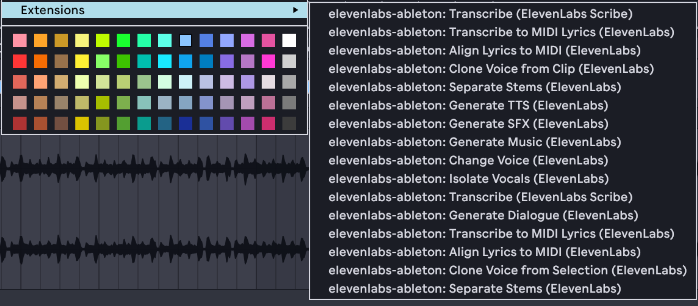 |
| Generate Text-to-Speech | 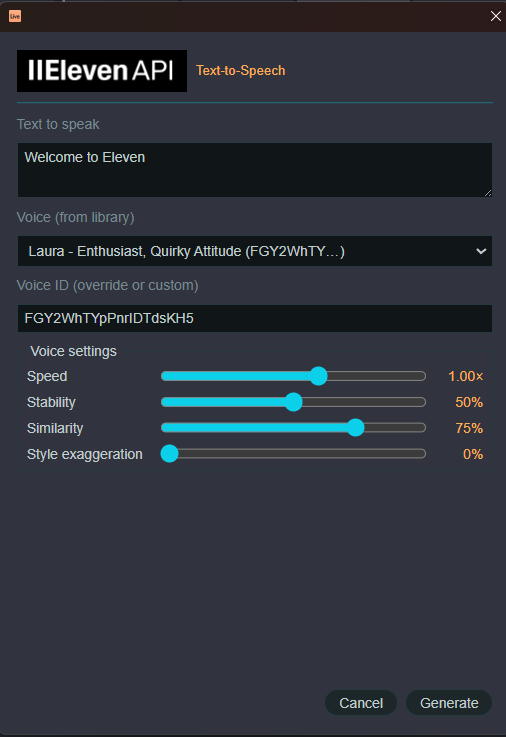 |
| Generate Sound Effects | 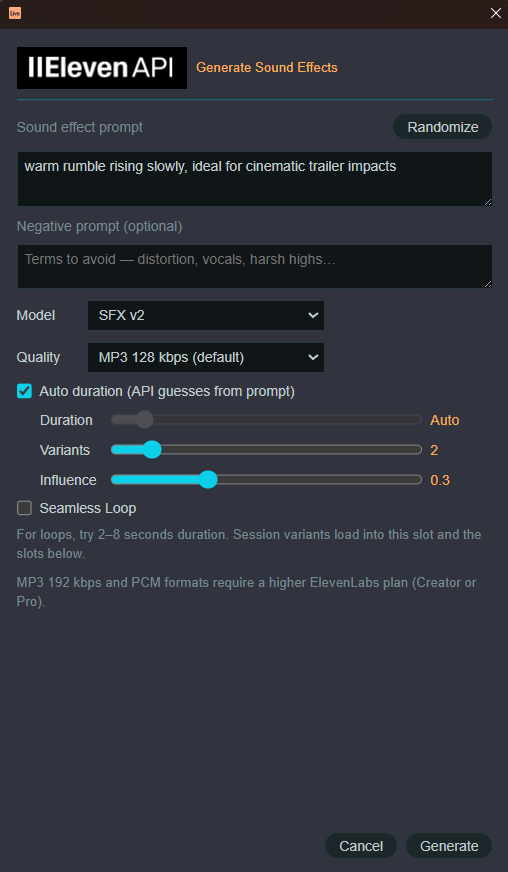 |
| Generate Music | 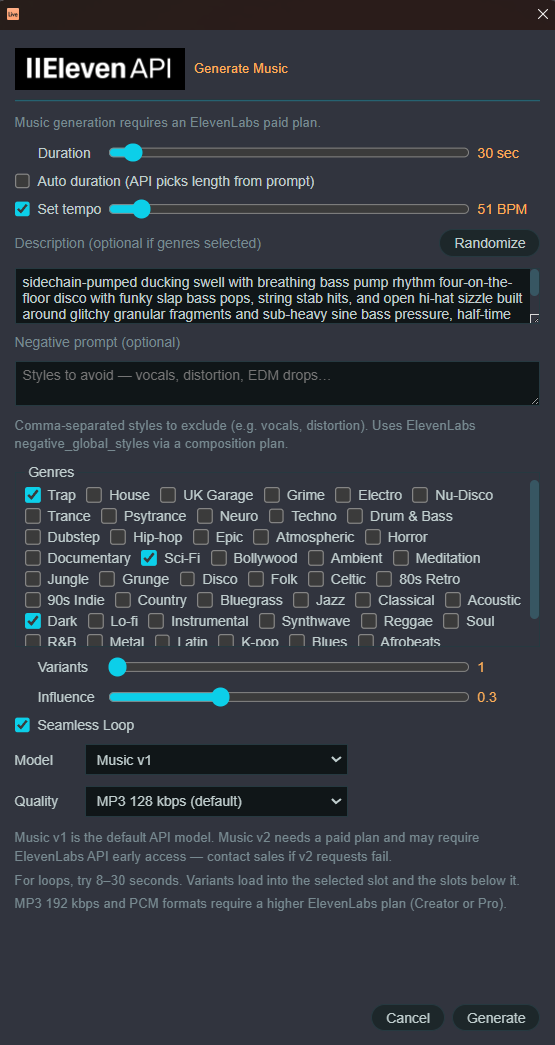 |
| Generate Dialogue | 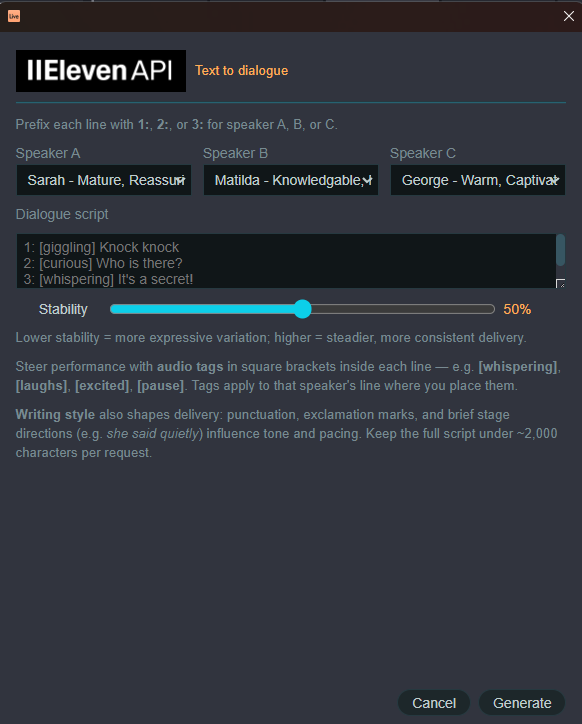 |
| Generate Drum Rack SFX | 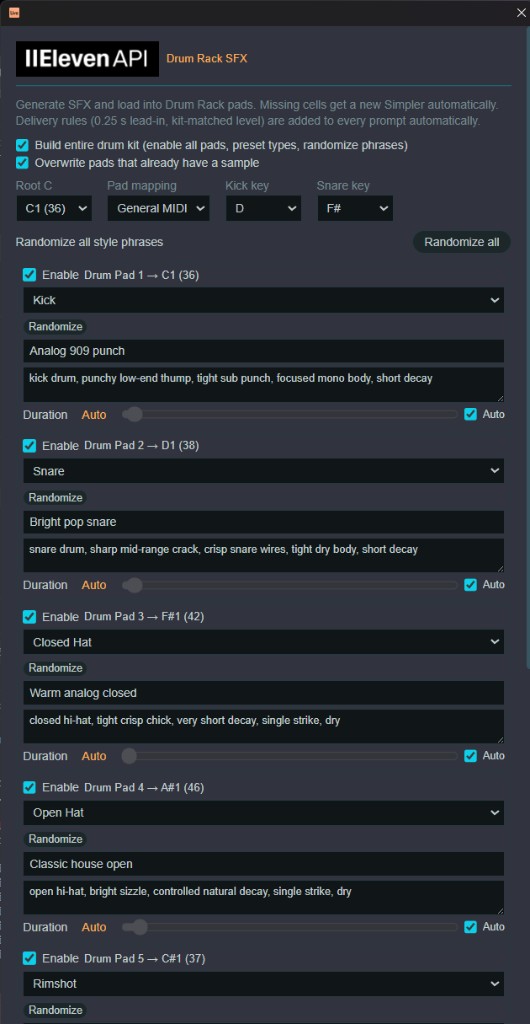 |
ElevenLabs API Ableton Extension
Current Capabilities
Right-click clips, tracks, slots, devices, or selections in Live to access ElevenLabs workflows. Generated audio is imported into your Live Set automatically.
| Category | Actions | Where |
|---|---|---|
| Generate | TTS (Flash v2.5 / Eleven v4 / Eleven v3), SFX, Music (v2.5 default, v2, v1 deprecated), Dialogue (v3 / v4), Music inpainting (extend, regenerate, loop, similar) | Clip slot, arrangement selection, audio clip |
| Batch | TTS to multiple session slots | Multi-selected clip slots |
| Transform | Voice changer, vocal isolation (arrangement + Session clips/slots) | Arrangement selection, audio clip, audio clip slot |
| Stems | Separate into 2 or 6 stems → new tracks | Audio clip, arrangement selection |
| Transcribe | Scribe STT (text modal); optional arrangement locators | Audio clip, arrangement selection |
| Lyrics → MIDI | Scribe word timestamps → MIDI markers | Audio clip, arrangement selection |
| Align lyrics | Forced alignment with your transcript → MIDI | Audio clip, arrangement selection |
| Samples | TTS / SFX into Simpler | Simpler device |
| Drums | SFX into drum rack — seven pad slots, Build entire kit, Sequential or GM mapping | Drum rack, MIDI clip slot |
| Voice | Library picker with search, gender, age, accent, language, and category filters | TTS, voice changer, dialogue |
| Clone voice | Instant voice clone from audio | Audio clip, arrangement selection |
| Pronunciation | Custom word pronunciation for TTS | Audio track (any) |
v0.8.0 adds Music v2.5 (default), Eleven v4 for dialogue and text-to-speech, arrangement locators, clip names and colors, and voice-picker filters. Generated clips are named and colored. It runs on Live 12.4.15 beta and Live 13.0 beta. Spec: docs/v0.8.0-features.md.
v0.5.0 Session Isolate Voice on audio clip slots and clips replaces the clip in place and preserves loop settings.
v0.4.0 arrangement TTS also applies light post-import FX (track volume + reverb mix when available).
SFX, Music & Drum Rack modals
Generation modals share the extension’s dark theme, Randomize prompt button, and progress feedback. Options below apply to Generate SFX, Generate Music, and Drum Rack SFX unless noted.
Sound effects (Generate SFX)
Right-click a clip slot, arrangement selection, or Simpler → Generate SFX (ElevenLabs).
| Control | Description |
|---|---|
| Randomize | Fills the prompt with a random descriptive phrase (word banks + templates; loop adds a seamless-loop suffix). |
| Duration | Slider 0.5–30 s, or Auto duration (on by default). Toggle sits above the slider. |
| Variants | Slider 1–10. Session View: each variant loads into the selected clip slot and consecutive slots below (no picker). Arrangement / Simpler: variant picker when > 1. |
| Prompt influence | Slider 0–1 (default 0.3). |
| Negative prompt | Optional terms to avoid; appended to the text prompt as an “Avoid: …” clause. |
| Auto duration | On by default — omits length so the API guesses from the prompt (0.5–30 s). |
| Quality | MP3 bitrates, PCM, or Opus. MP3 192 / PCM need Creator or Pro. |
| Seamless Loop | Enables loop generation (SFX v2). |
Imported clips respect the loop toggle (Session clip Loop is set in Live when enabled).
Music (Generate Music)
Right-click an audio clip slot or arrangement selection → Generate Music (ElevenLabs). Requires a paid ElevenLabs plan.
| Control | Description |
|---|---|
| Duration | Auto duration off by default. Manual slider 3–600 s (default 30 s when auto is off). |
| Description | Free-text prompt; optional if at least one genre is selected. |
| Randomize | Random rich music prompt (genres, instruments, mood, production, cinematic flavor). |
| Variants | Slider 1–10. Session View: each variant loads into the selected clip slot and consecutive slots below on the same track (no picker). Arrangement: multi-variant still uses the variant picker. |
| Genres | Single grid: electronic (Trap, House, Techno, …), cinematic styles (Epic, Horror, Sci-Fi, Bollywood, …), and styles such as Jazz, Folk, 80s Retro, Acoustic, etc. |
| Mood toggles | Folded into Genres (Dark, Lo-fi, Instrumental, etc.). Instrumental also sets API force_instrumental. |
| Set tempo | On by default; slider starts at Live’s set tempo and adds BPM to the prompt. When enabled, generate also sets song.tempo in the Live Set. |
| Prompt influence | Slider 0–1 (default 0.3). |
| Negative prompt | Optional comma-separated styles to avoid (e.g. vocals, distortion). Uses a composition plan with negative_global_styles instead of plain prompt mode. |
| Auto duration | Off by default — sends music_length_ms from the duration slider (default 30 s). Check to let the API pick length from the prompt. |
| Quality | MP3 bitrates, PCM, or Opus (output_format). MP3 192 / PCM need Creator or Pro. |
| Model | Music v2.5 (default), Music v2, or deprecated Music v1. v2 and v2.5 support inpainting. |
| Seamless Loop | Uses API loop generation mode; clip Loop is set in Live on import. |
| Arrangement locators | Arrangement only. Off by default. Adds a cue point per composition-plan section. |
The composed prompt merges selected genres, optional tempo, and your description before calling the music API. Extend, similar, and seamless-loop inpainting keep the generated length instead of cutting it back to the source clip. The inpaint modal chooses Music v2.5 or v2 and an output quality.
Drum Rack SFX (Drum Rack / MIDI clip slot context menu)
Right-click a Drum Rack or a MIDI clip slot → Generate Drum Rack SFX (ElevenLabs). On an empty MIDI track (no devices), an empty Drum Rack is inserted automatically. Modal title: Drum Rack SFX. Seven pad slots, each with:
| Control | Description |
|---|---|
| Enable | Default: only Pad 1 enabled (not persisted). |
| Type | Kick, Snare, Open Hat, Closed Hat, Rimshot, Perc, Clap, Other. |
| Style phrase | Randomizable mood/style text; 20 phrases per type. |
| Characteristics | Editable sound character (delivery rules added automatically at generation). |
| Duration + Auto | Per-pad duration slider or API auto-duration (default on). |
Build entire drum kit enables all 7 pads, presets types, and randomizes style phrases. Root C selects the anchor note (C-2 through C3, default C1). Pad mapping is Sequential (consecutive from root C) or General MIDI (GM offsets by drum type). Kick key and Snare key apply optional pitch character. Overwrite occupied replaces pads that already have samples. Uses SFX v2 only. Missing Simplers are created automatically. Last pad layout (except enable state) is remembered in elevenlabs-config.json.
Each enabled pad is a separate ElevenLabs API call (uses credits accordingly).
Prerequisites
- ElevenLabs account with API access — elevenlabs.io
- Live 12.4.15 beta or Live 13.0 beta with extensions enabled
- An API key (see below)
Storage directory & API key
The extension needs an ElevenLabs API key and a storage directory — a folder on disk that Live’s Extension Host can read and write. That folder holds your key (optional file-based setup) and persisted extension settings.
Where to keep api-key.txt
Create a folder outside the extension git repo (do not commit secrets). Put a single-line file named api-key.txt in that folder:
C:\Users\You\Documents\ElevenLabs\api-key.txt     # Windows example
/Users/you/Documents/ElevenLabs/api-key.txt       # macOS example
The file should contain only your API key (one line, no quotes, no extra spaces). Example:
sk_xxxxxxxxxxxxxxxxxxxxxxxxxxxxxxxx
You can use any path you prefer — e.g. ~/ElevenLabs/, a cloud-synced folder, or a parent folder next to your clone when developing. What matters is that the same folder is passed as --storage-directory (or via .env) when you launch the extension.
How to configure the storage directory
Tell the Extension Host which folder to use:
| How you run the extension | What to set |
|---|---|
npm start (development) | ELEVENLABS_STORAGE_DIRECTORY in project .env (see Getting started) |
ableton-extensions-cli run | --storage-directory /path/to/your/folder |
| Either | Environment variable ELEVENLABS_STORAGE_DIRECTORY (absolute path recommended) |
Example .env in the project root (gitignored):
EXTENSION_HOST_PATH=C:\Path\To\Live\...\ExtensionHostNodeModule.node
ELEVENLABS_STORAGE_DIRECTORY=C:\Users\You\Documents\ElevenLabs
# Optional — defaults to {storage}/.elevenlabs-temp
# ELEVENLABS_TEMP_DIRECTORY=C:\Users\You\Documents\ElevenLabs\.elevenlabs-temp
npm start reads .env, resolves the storage path, and passes --storage-directory and --temp-directory to the Extensions CLI automatically. npm run start:12 and start:13 also pass --live. If ELEVENLABS_STORAGE_DIRECTORY is unset, it looks for api-key.txt in the parent of the project folder, then in the project root (developer convenience only).
Manual launch (same paths as above):
ableton-extensions-cli run --storage-directory "C:\Users\You\Documents\ElevenLabs" --temp-directory "C:\Users\You\Documents\ElevenLabs\.elevenlabs-temp"
How the API key is resolved
At runtime the extension looks for a key in this order:
- Environment variable
ELEVENLABS_API_KEY(if set in the Extension Host process) - File
{storageDirectory}/api-key.txt
If neither is found, the extension prompts you to paste your API key in a modal, validates it when online, and saves it to api-key.txt. Right-click a Drum Rack or Audio Track → Manage ElevenLabs API Key to update or remove the saved key later.
Never commit your API key. Do not place api-key.txt inside the repo or add it to git. Use a personal folder + ELEVENLABS_STORAGE_DIRECTORY, or set ELEVENLABS_API_KEY only in your local shell / .env (gitignored).
Extension Host compatibility
Live's Extension Host omits some Web APIs (Response, URL, native FormData, etc.). The bundle uses a minimal Node shim banner plus formdata-polyfill for non-file requests. File uploads (stem separation, STT, voice clone) use manual multipart in src/multipart-upload.ts because fetch + the FormData polyfill drops file parts. See AGENTS.md before changing the build or upload path.
ElevenLabs plan limits
Some APIs require a paid ElevenLabs plan (e.g. Music generation, stem separation). On a free tier, those actions show an error dialog instead of crashing — e.g. Music API is not available for free users. TTS and SFX typically work on free/creator tiers depending on your quota.
Install & run (pre-built .ablx)
Download elevenlabs-ableton-0.8.0.ablx from a GitHub Release (or build locally — see Package for release).
- Open Live → Preferences → Extensions
- Drag and drop the
.ablxonto the Extensions page - Enable the extension in the list
- Configure your API key and storage directory
- Right-click in Live — menu items are prefixed with (ElevenLabs)
Developer Mode is not required for installed .ablx files; it is only needed when running from source via npm start.
Persisted settings (in your storage directory)
When a storage directory is configured, the extension also reads/writes:
| File | Contents |
|---|---|
api-key.txt | Your API key (optional if you use ELEVENLABS_API_KEY instead) |
elevenlabs-config.json | Cloned voice IDs, pronunciation dictionaries, active dictionary, last-used drum kit settings |
Temp audio before Live import is written under {storageDirectory}/.elevenlabs-temp by default (or ELEVENLABS_TEMP_DIRECTORY if set). That folder is safe to delete; it is recreated as needed.
Features by release
| Version | Highlights |
|---|---|
| 0.1.0 | TTS → clip slot & arrangement |
| 0.2.0 | SFX, music, batch TTS, voice changer, vocal isolation, Scribe, Simpler workflows, post-import FX |
| 0.3.0 | Voice library picker, text-to-dialogue, drum rack SFX, transcribe → MIDI |
| 0.4.0 | Stem separation, voice clone, forced alignment → MIDI, pronunciation rules; enhanced SFX/Music/Drum Rack modals |
| 0.5.0 | Session voice isolation; SFX/Music modal UX; Live tempo sync; audio-slot guards; UI layout polish |
| 0.6.0 | Drum Rack SFX pad-slot modal; API key onboarding & management; MIDI clip slot drum entry |
| 0.7.0 | Music inpainting: extend, regenerate section, seamless loop, generate similar |
| 0.8.0 | Music v2.5, Eleven v4 speech and dialogue, arrangement locators, clip names and colors, voice filters, Live 12 and 13 beta support |
Full history: CHANGELOG.md. Per-feature versions: src/version.ts → FEATURE_VERSIONS.
Roadmap
Shipped (v0.8.0)
- Music v2.5 default, with v2 and deprecated v1 still available
- Eleven v4 dialogue (similarity, before/after context) and Eleven v4 in the text-to-speech picker
- Arrangement locators for music sections, dialogue turns, and transcript sentences
- Named, colored generated clips and named take lanes
- Voice filters (search, gender, age, accent, language, category) plus cloned voices, up to 150 voices
- Live 12.4.15 beta and Live 13.0 beta (
npm run start:12/start:13)
Shipped (v0.7.0)
- Music inpainting: Extend, Regenerate Section, Seamless Loop, Generate Similar
Shipped (v0.6.0)
- Drum Rack SFX — pad-slot modal, Root C, Sequential/GM mapping, Build entire kit, MIDI clip slot menu, SFX v2 only
- API key — onboarding modal, Manage API Key, show/hide saved key
Shipped (v0.5.0)
- Session Isolate Voice on audio clip slots and clips
- SFX / Music modal layout — titles, auto-duration defaults, tempo sync, half-width Model/Quality rows
- Audio-track clip slot guards for Session generators
Shipped (v0.4.0)
- Music stem separation → multi-track with mixer balance
- Instant voice clone (persisted)
- Forced alignment → MIDI lyric markers
- Pronunciation dictionary rules (auto-applied to TTS)
- SFX / Music / Drum Rack modals — sliders, models, loops, randomizers, music session multi-variant clip loading
Planned
| Priority | Feature |
|---|---|
| Medium | TTS word timestamps → MIDI lyric markers |
| Medium | Character or quota hint in generation modals |
| Medium | Place generated audio on existing cue points |
| Later | Music finetunes, waveform preview, editable transcripts |
| Later | Voice design, dubbing, generation history |
| Later | User-edited music section plan |
Details: docs/roadmap.md and docs/v0.8.0-features.md.
Developers Guide
Architecture (short)
Context menu → command → modal (optional) → progress dialog
  → ElevenLabsClient (@elevenlabs/elevenlabs-js)
  → temp file → importIntoProject → createAudioClip / replaceSample / MidiClip.notes
Outbound audio (voice change, STT, stems, clone): renderPreFxAudio → ElevenLabs file APIs.
All dependencies are bundled into dist/extension.js (~5.2 MB) via esbuild. The Extension Host does not resolve node_modules at runtime.
Project structure
elevenlabs-ableton/
├── manifest.json          # Extension metadata + minimumApiVersion
├── package.json
├── build.ts               # esbuild bundle (CJS, .html as text)
├── src/
│   ├── extension.ts     # activate(), commands, context menus
│   ├── version.ts         # EXTENSION_VERSION + FEATURE_VERSIONS
│   ├── elevenlabs-client.ts
│   ├── pipelines.ts
│   ├── audio-io.ts / live-io.ts / midi-io.ts / live-markers.ts / clip-metadata.ts
│   ├── multipart-upload.ts # Manual multipart for Extension Host file APIs
│   ├── ui-branding.ts     # Modal logo + shared dark theme
│   ├── ui.ts + ui/*.html  # Live webview modals
│   └── ui/assets/         # elevenapi-logo.png, ableton-logo.png (README + bundled modals)
├── vendor/                # Ableton SDK + CLI .tgz (see setup below)
├── docs/                  # BMad project knowledge
├── bmad-output/           # Sprint / implementation artifacts
├── dist/                  # Built extension (gitignored — run npm run build)
├── CHANGELOG.md
└── LICENSE                # GPL-3.0-or-later
Deeper context: docs/project-context.md, ../ABLETON-ELEVENLABS-RESEARCH.md.
SDK & dependency versions
| Package | Version | Role |
|---|---|---|
@ableton-extensions/sdk | 1.0.0-beta.1 (vendor .tgz) | Live object model, UI, resources. API stays 1.0.0. |
@ableton-extensions/cli | 1.0.0-beta.1 (vendor .tgz) | ableton-extensions-cli package; dev run via scripts/start-dev.ts |
@elevenlabs/elevenlabs-js | ^2.71.0 | ElevenLabs API (bundled) |
fflate | ^0.8.3 | Stem separation ZIP extraction |
esbuild | 0.28.2 | Production bundle |
typescript | ^7.0.2 | Type-check (skipLibCheck: true) |
Ableton extensions docs: ableton.github.io/extensions-sdk
Getting started (Git / GitHub)
1. Clone the repository
git clone https://github.com/YOUR_ORG/elevenlabs-ableton.git
cd elevenlabs-ableton
2. Install Node dependencies
npm install
Requires Node.js ≥ 24.16.0 for building (package.json engines). The Extension Host bundled with Live runs Node 24.14.1, so extension code must not use Node APIs newer than that.
3. Add Ableton SDK vendor packages
package.json references local tarballs (not published to npm):
vendor/ableton-extensions-sdk-1.0.0-beta.1.tgz
vendor/ableton-extensions-cli-1.0.0-beta.1.tgz
Obtain these from the Ableton Extensions SDK release (or your SDK dev kit) and place them in vendor/ before npm install. Without them, install will fail.
4. Configure the Extension Host path
Create or edit .env in the project root (gitignored):
EXTENSION_HOST_PATH=C:\Path\To\Live\Program\ExtensionHost\ExtensionHostNodeModule.node
# Optional when more than one beta is installed: 12 or 13
# ABLETON_LIVE=12
The path is set when you scaffold with @ableton-extensions/create-extension; adjust if Live is installed elsewhere.
5. Configure storage directory & API key
See Storage directory & API key for the full user-facing guide. Minimal developer setup:
- Create a folder outside the repo, e.g.
C:\Users\You\Documents\ElevenLabs - Save your key as
api-key.txtin that folder (one line) - Add to
.env:
ELEVENLABS_STORAGE_DIRECTORY=C:\Users\You\Documents\ElevenLabs
Alternative — environment variable only (no api-key.txt):
# PowerShell
$env:ELEVENLABS_API_KEY = "your-key-here"

# bash
export ELEVENLABS_API_KEY=your-key-here
You still need --storage-directory (or ELEVENLABS_STORAGE_DIRECTORY) if you want cloned voices and pronunciation rules persisted in elevenlabs-config.json.
6. Build and run in Live
# Development (source maps, not minified) — newest installed beta, or ABLETON_LIVE / EXTENSION_HOST_PATH
npm start
npm run start:12
npm run start:13
# Production bundle
npm run build

# Package for distribution (.ablx)
npm run package
7. Enable in Live
- Open Live 12.4.15 beta or Live 13.0 beta
- Preferences → Extensions → enable Developer Mode
- Run
npm start,npm run start:12, ornpm run start:13so Live loads the extension - Confirm in the Extension Host console:
[elevenlabs-ableton] v0.8.0 active
Package for release
From the project root, with Node.js ≥ 24.16.0 and vendor/*.tgz SDK packages installed:
npm install
npm run check:api          # optional — needs ELEVENLABS_API_KEY
npm run package            # production build + elevenlabs-ableton-0.8.0.ablx
npm run package runs npm run build first (type-check, esbuild bundle, post-build checks), then ableton-extensions-cli package. The .ablx file is written next to the project (gitignored). Attach it to a GitHub Release and update release notes from CHANGELOG.md.
Manual steps before tagging: align versions in src/version.ts, manifest.json, and package.json; run docs/pre-release-checklist.md.
Development workflow
| Task | Command / location |
|---|---|
| Type-check | npx tsc --noEmit (part of npm run build) |
| Dev build + run | npm start |
| Production build | npm run build |
Package .ablx | npm run package |
| Bump release | src/version.ts + manifest.json + package.json + CHANGELOG.md |
| Add a feature | Register in FEATURE_VERSIONS in version.ts |
Adding a new feature (convention)
- API wrapper in
src/elevenlabs-client.ts - Pipeline in
src/pipelines.ts(usewithElevenLabsProgress) - Modal in
ui/*.html+ prompt insrc/ui.ts - Command + context menu in
src/extension.ts - Document in
CHANGELOG.mdand bump version
BMad Method
This project uses BMad for planning artifacts:
- Agent entry: AGENTS.md
- Sprint status:
bmad-output/planning-artifacts/sprint-status.yaml - Team config overrides:
_bmad/custom/config.toml
npm scripts
| Script | Description |
|---|---|
npm start | Dev bundle, then connect to Live (start:12 / start:13 pick a beta) |
npm run build | Type-check + production bundle → dist/extension.js (runs check:build after) |
npm run build:dev | Type-check + dev bundle (source maps) |
npm run package | Production build + ableton-extensions-cli package |
npm run smoke | Build, fake-host commands, and API smoke. Does not start or connect to Live |
npm run smoke -- --music | Smoke plus the music v2.5 credit test |
npm run check:build | Version sync, bundle markers, unit checks (no API key) |
npm run check:api | Above plus voices, speech, v4 dialogue, SFX, and Scribe (needs an API key) |
npm run smoke:live:12 | Live self-test. Open Live 12 yourself first |
npm run smoke:live:13 | Live self-test. Open Live 13 yourself first |
# After clone — validate before opening Live
npm install
npm run build
npm run check:api    # optional; requires ELEVENLABS_API_KEY
See docs/pre-release-checklist.md and docs/roadmap.md.
Documentation index
| Document | Audience |
|---|---|
| CHANGELOG.md | Release notes (v0.1.0 → v0.8.0) |
| SUMMARY.md | Table of contents for this README |
| LICENSE | GPL-3.0-or-later terms |
| docs/roadmap.md | Planned features |
| docs/v0.8.0-features.md | Current feature spec |
| docs/v0.6.0-features.md | v0.6.0 Drum Rack and API key spec |
| docs/v0.5.0-features.md | v0.5.0 feature spec |
| docs/v0.4.0-features.md | v0.4.0 feature spec |
| docs/code-review-notes.md | Architecture review notes |
| docs/project-context.md | Lean dev/agent context |
| ../ABLETON-ELEVENLABS-RESEARCH.md | Full ElevenLabs ↔ Ableton research |
| AGENTS.md | Cursor / BMad agents |
License & attribution
- License: GNU General Public License v3.0 or later — Copyright (C) 2026 Tom Carlile
- Author: Tom Carlile (
manifest.json) - Ableton Extensions SDK — Ableton
- ElevenLabs API — ElevenLabs
Support & contributing
- Check CHANGELOG.md and docs/roadmap.md for known scope
- Open a GitHub issue with Live version, extension version (
src/version.ts), and steps to reproduce - PRs: follow the feature convention above; bump
FEATURE_VERSIONSandCHANGELOG.md
Quick sanity check after clone:
npm install
npm run build
# expect: dist/extension.js ~5.2 MB, exit 0
Rate this extension
One rating per account; you can change it any time.
Comments
No comments yet.