Genre Scaffold
v0.1.4templateStock-first MIDI and arrangement scaffold generator for Ableton Live Extensions.
 matt petters—No ratings yet
Genre Scaffold
Stock-first MIDI, composition, tempo, and arrangement generation for Ableton Live Extensions.
Genre Scaffold creates a useful starting session from a small set of musical choices. It is aimed at producers who want a genre-appropriate first draft with enough structure to start editing immediately, while still leaving room for experimentation.
Status
MVP packaged, browser-tested, and in-Live smoke tested. Generation tests pass across all five MVP genres, including two seeded rounds per genre to confirm meaningful variation. Drum and percussion tracks now build sampled Drum Racks from Ableton's Core Library instead of leaving empty racks.
Remaining release checks:
- Reinstall the latest versioned
.ablx - Run one generation per genre in Live and confirm each generated Drum Rack pad is audible
- Run a second generation per genre in Live and inspect the musical difference
Features
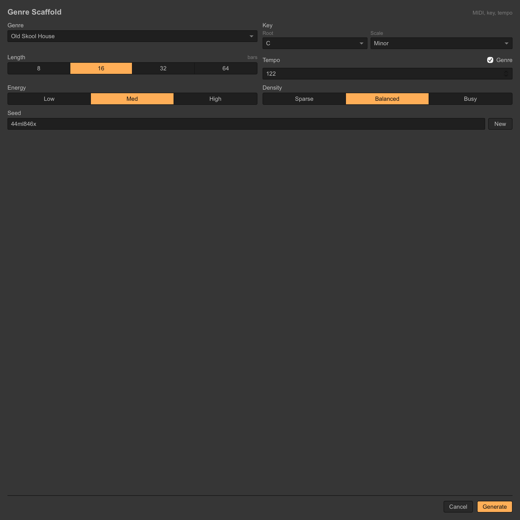
- Ableton modal UI with genre, root, scale, length, tempo, energy, density, and seed controls
- Generates drums, bass, harmony, lead/chop, and percussion or FX MIDI roles
- Creates arrangement sections and cue points
- Sets project tempo from the selected genre or manual override
- Uses deterministic seeds for repeatable variations
- Stays stock-only for V0, with insertable Ableton stock-device chains
- Finds Ableton's Core Library inside installed Live app bundles and common Core Library folders
- Populates generated Drum Rack pads with Simpler chains and imported Core Library samples
- Uses a kit waterfall: 909/707/808 for house and tech house, Garage/707/909/606 for UKG, 808 for trap, Boom Bap/vinyl/MPC-flavored samples for 90s hip hop, percussion kits for perc tracks, then any matching Core Library one-shots
- Creates audio one-shot failsafe tracks if Drum Rack pad population fails, so demo output remains audible
- Labels generated tracks with the sample source target and
GS <version>for stale-build spotting - Adds a
Clear Genre Scaffoldcontext action and replace-selection confirmation for cleaning generated material before another pass - Applies conservative parameter tuning to inserted effects when Live exposes matching parameters
- Ships with a CLI that writes
.jsonscaffold data and multitrack.midfiles
Genres
- Old Skool House
- Tech House
- UK Garage
- Trap
- 90s Hip Hop
Setup
Requirements:
- Ableton Live 12 Beta with Extensions Developer Mode enabled
- Node.js
24.14.1or newer - The Ableton Extensions SDK and CLI tarballs in
vendor/; see vendor/README.md
Install dependencies:
cd extensions/genre-scaffold
npm install
cp .env.example .env
Update .env if your Ableton Live Beta app lives somewhere else:
EXTENSION_HOST_PATH=/Applications/Ableton Live 12 Beta.app/Contents/Helpers/ExtensionHost/ExtensionHostNodeModule.node
Run In Live During Development
Developer Mode changes how extensions are loaded. When Developer Mode is enabled, Live shuts down the Live-managed Extension Host and expects you to run the host yourself.
Use this workflow while developing:
- Enable Developer Mode in Live Preferences or Settings > Extensions.
- Start the extension host from this extension folder:
npm start
- Keep that process running while testing context menus in Live.
You should see output like:
Starting Extension Host...
[Genre Scaffold]: Genre Scaffold activated.
If Developer Mode is on and npm start is not running, the extension can appear in Live's installed extensions list but its context menu actions will not be active.
Run Installed Package
For installed .ablx testing, disable Developer Mode, restart Live Beta, and let Live run the installed extension host.
Then use the extension from a MIDI track or MIDI arrangement selection context menu:
Generate Genre Scaffold
The easiest triggers are:
- Arrangement View: select a time range on a MIDI track, then right-click inside the selected region
- Session View: right-click a clip slot on a MIDI track
- Arrangement View: right-click an existing MIDI clip
- Arrangement View: right-click a MIDI track header
The extension opens the options modal, then creates tracks, clips, notes, section markers, and tempo.
Use Clear Genre Scaffold from the same context menus to remove generated material. With a highlighted Arrangement range, it clears generated clips and markers inside that selection; without a range, it removes generated Genre Scaffold tracks and markers from the set.
If you generate over a highlighted range that already contains Genre Scaffold material, the extension asks before replacing it. The confirmation includes a Don't ask again checkbox for fast iteration.
Drum Rack Samples
Genre Scaffold looks for Ableton's bundled Core Library in places such as:
/Applications/Ableton Live 12 Beta.app/Contents/App-Resources/Core Library
/Applications/Ableton Live 12 Suite.app/Contents/App-Resources/Core Library
When a generated track starts with Drum Rack, the extension inserts a Drum Rack, creates drum chains for the MIDI notes used by that track, inserts Simpler on each chain, imports matching Core Library samples into the Live project, and replaces each Simpler sample.
The target kit/palette is genre-aware:
- Old Skool House and Tech House prefer
909 Core Kit, then 707/808-style fallbacks. - UK Garage prefers
Garage Kit, then 707/909/606-style fallbacks. - Trap prefers
808 Core Kit. - 90s Hip Hop prefers
Boom Bap Kitand vinyl/MPC-flavored one-shots. - Percussion tracks prefer percussion, conga, shaker, rim, tom, and miscellaneous one-shot folders.
If the preferred preset or sample folder is missing, the extension falls through to any matching Core Library drum one-shots. To customize the result, unfold the Drum Rack and drag your own sample onto any pad, or select the Simpler inside a pad chain and replace its sample.
If Live cannot populate the Drum Rack chains through the SDK host, Genre Scaffold creates audio one-shot failsafe tracks from the same sample plan. Those tracks are intentionally labeled audio failsafe so they can be deleted or replaced after the demo-safe pass.
Package
Build and package an installable Ableton extension:
npm run package
The package is written with the current manifest version in the filename:
dist/genre-scaffold_<version>.ablx
Install it by adding the .ablx package from Ableton Live Beta Preferences or Settings > Extensions.
CLI
Generate scaffold JSON and MIDI without Ableton:
npm run generate -- --genre uk-garage --key "F minor" --bars 16 --seed hot-iron --out examples/ukg
This writes:
examples/ukg.jsonexamples/ukg.mid
Useful options:
--genre:old-skool-house,tech-house,uk-garage,trap,90s-hip-hop--key: root and optional scale, such asC minor,F# minor,D dorian,A major, orG mixolydian--scale: override the scale in--key--tempo: exact BPM, otherwise the genre default is used--bars: usually8,16,32, or64--density:sparse,balanced, orbusy--energy:low,medium, orhigh--seed: deterministic variation seed--out: output path without extension
Validation
Run unit tests:
npm test
Run the two-round variation report:
npm run validate:generations
The validation checks that every MVP genre generates enough MIDI material, keeps arrangement length intact, and changes at least two tracks between different seeds.
Notes
- V0 does not require third-party samples, packs, or VSTs.
- The SDK beta exposes song key/scale as read-only, so key currently controls generated MIDI but does not update Live's global key/scale UI.
- The SDK beta can insert built-in Live devices by name, but does not currently expose reliable ADG/preset or third-party VST loading.
- The SDK beta does not expose Live's native Info Text setter for tracks or clips. Genre Scaffold generates helpful per-track notes internally and logs them, while the visible Live track name includes the source target and
GS <version>. - Advanced mode is planned for per-role stock instrument choices, preferred racks/presets, user sample packs, and VST preset swaps once those loading paths are validated.
Rate this extension
One rating per account; you can change it any time.
Comments
No comments yet.