live-to-wwise
v1.0.0Ableton Live Extension that communicates with audio middleware
 Songyuan Shi—No ratings yet
live-to-wwise
An Ableton Live extension that sends audio clips into a Wwise project over the Wwise Authoring API (WAAPI) — the Ableton counterpart to ReaWwise.
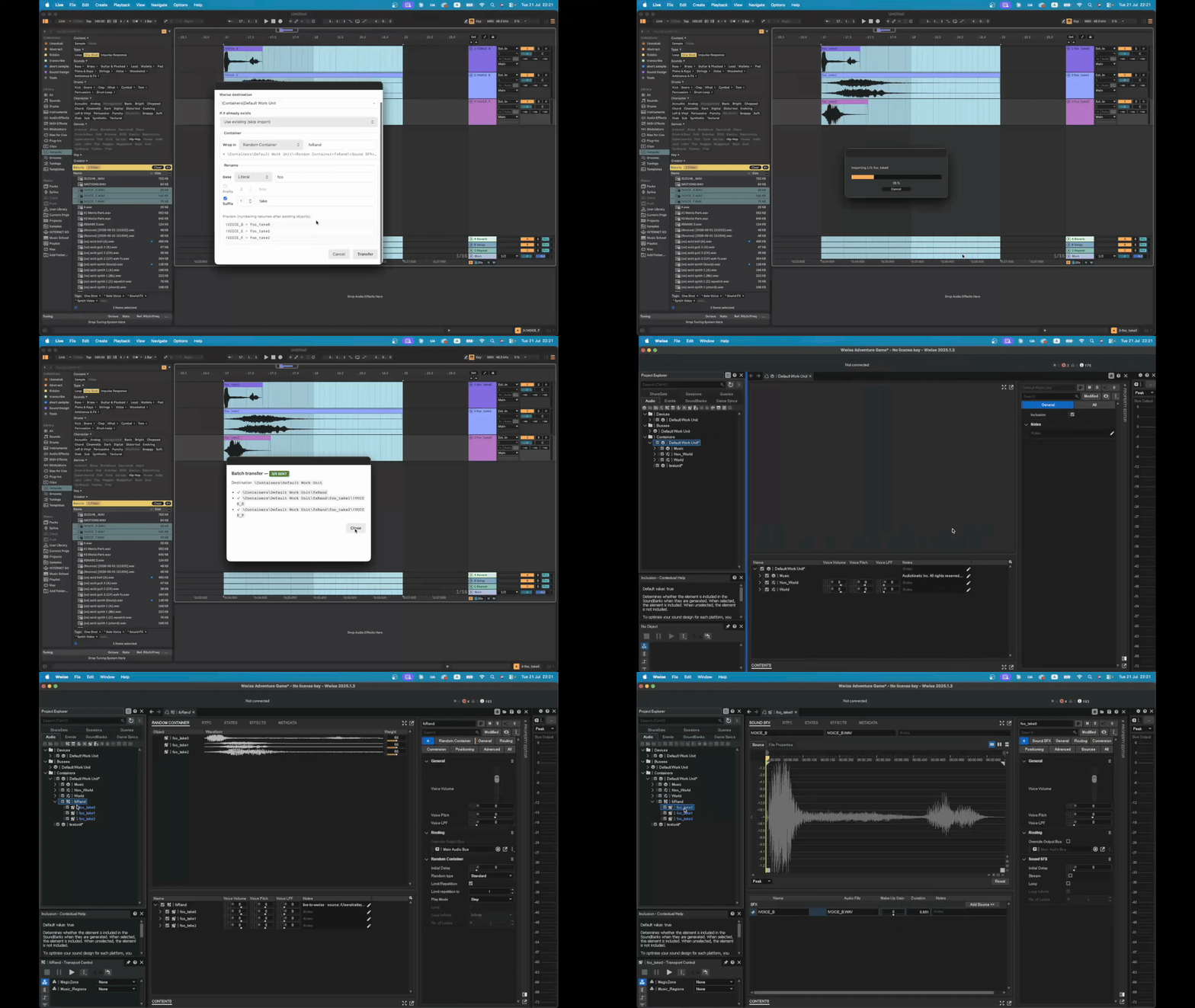
Select audio clips in Live, right-click Send to Wwise…, batch-rename them, pick a destination in the Wwise hierarchy, optionally wrap them in a container, and import — all without leaving Live.
Requirements
- Ableton Live 12.4.5 (currently in public beta).
- Wwise open, with a project loaded and the Authoring API enabled (Wwise → Project Settings), listening on the default WAMP port 8080.
- Node ≥ 24.14.1 (the Extension Host runtime) for building.
Live and Wwise run on the same machine — the extension talks to
ws://127.0.0.1:8080/waapi.
Get Started
Install to Live
Download Release and install in Ableton Settings - Extension.
Build
npm install          # installs the vendored SDK + CLI from ./vendor
npm start            # dev build + launch in the Extension Host (extensions-cli run)
Usage
With Wwise open (project loaded, Authoring API on):
- Select clips in Live.
- Arrangement View — drag a time selection across one or more audio tracks (take lanes included). Clips overlapping the range are collected.
- Session View — select one or more clip slots (across tracks/scenes). Empty slots and MIDI clips are skipped.
- Right-click → “Send to Wwise…”. The extension reads the Wwise hierarchy (with a progress dialog) and opens the batch form.
- In the batch form:
- Wwise destination — a searchable combobox of container-capable objects under the Actor-Mixer Hierarchy; free-text is also accepted.
- If it already exists —
useExisting(skip) /replaceExisting(update audio) /createNew(auto-rename). - Container — optionally wrap the batch in a Random / Sequence / Switch / Blend container (find-or-created by name; all sounds land inside it).
- Rename —
prefix · base · suffix:- base — each clip’s original name, or a literal applied to all.
- prefix
NNname, suffixnameNN— zero-padded running index; a blank affix name collapses to just the index. - Live
old → newpreview; numbering resumes after objects already at the destination (or inside the chosen container).
- Transfer. Clips are renamed in Live as one undo step (⌘Z reverts the
whole batch), then each source file is imported via
ak.wwise.core.audio.import. Each object gets a Notes line recording its Live source path, and all imported objects are revealed in the Wwise Project Explorer. A summary lists per-item success/failure.
Notes on behaviour
- Imports are copies. Wwise copies each WAV into the project’s
Originalsfolder and owns that copy — moving or renaming your Live-side sources never breaks the Wwise references. The rename only touches the Live clip name (which flows to the Wwise object name); disk files are left alone so clips never go offline. - Offline cache. The last-fetched hierarchy is cached to
hierarchy-cache.json. If Wwise is unreachable, the form still opens (with an “unreachable” banner) from the cache; the transfer itself then fails cleanly until Wwise is back. - Persistence. Host/port, last destination, import operation, rename, and
container settings persist between sessions in
environment.storageDirectory, falling back to~/.live-to-wwisewhen the host provides none. - Switch/Blend containers are created with their children, but switch/state and blend-track assignment is left to do manually in Wwise. Random/Sequence work out of the box (default container properties).
What it transfers (and doesn’t)
Transfers the clip’s source file (AudioClip.filePath), not a render — so
warp/trim, clip envelopes, and track FX are not captured. This is an SDK
limitation: only renderPreFxAudio is available (pre-FX, per audio track), and
MIDI/instrument tracks can’t be bounced. Region/FX-accurate export is future
work (see the roadmap). WAV/AIFF sources are recommended.
Architecture
Ableton Live (Extension Host, Node runtime)
  └─ live-to-wwise ── WAAPI (WAMP over WebSocket) ──▶ Wwise Authoring App
                       ws://127.0.0.1:8080/waapi        (ak.wwise.core.audio.import)
The WAAPI stack is hand-rolled and dependency-free (node:net +
node:crypto), so nothing native has to load inside the Host sandbox:
| Layer | File | Role |
|---|---|---|
| TCP probe | src/waapi/probe.ts | sandbox gate — can we open a socket? |
| WebSocket | src/waapi/websocket.ts | minimal RFC 6455 client |
| WAMP | src/waapi/client.ts | WaapiClient — HELLO/WELCOME, CALL/RESULT, SUBSCRIBE/EVENT |
| Wwise ops | src/wwise/import.ts, hierarchy.ts, cache.ts | import, destination/child queries, offline cache |
| Live side | src/live/selection.ts, rename.ts | resolve selections → clips; pure naming engine |
| UI | src/ui/dialogs.ts | modal HTML dialogs as data: URLs |
| Config | src/config.ts | persisted settings |
| Entry | src/extension.ts | context-menu actions + the runBatch orchestration |
Roadmap
Ableton Extension SDK is still under development, some useful actions of the DAW are not exposed yet. This repo will stay in active development and update as the SDK grows.
Rate this extension
One rating per account; you can change it any time.
Comments
No comments yet.