MIDI Daddy
v0.1.0Ableton Live Extension: chord progressions and matching melodies from a 19,529-file MIDI library, scale-aware via Live's Scale Mode.
 Bass Daddy Devices
MIDI Daddy
An Ableton Live Extension that brings a library of 19,529 curated MIDI files — chord progressions and melodies across 15 scales and all 12 keys — straight into Live's right-click menu, automatically matched to whatever scale you've got selected in Live's Scale Mode.
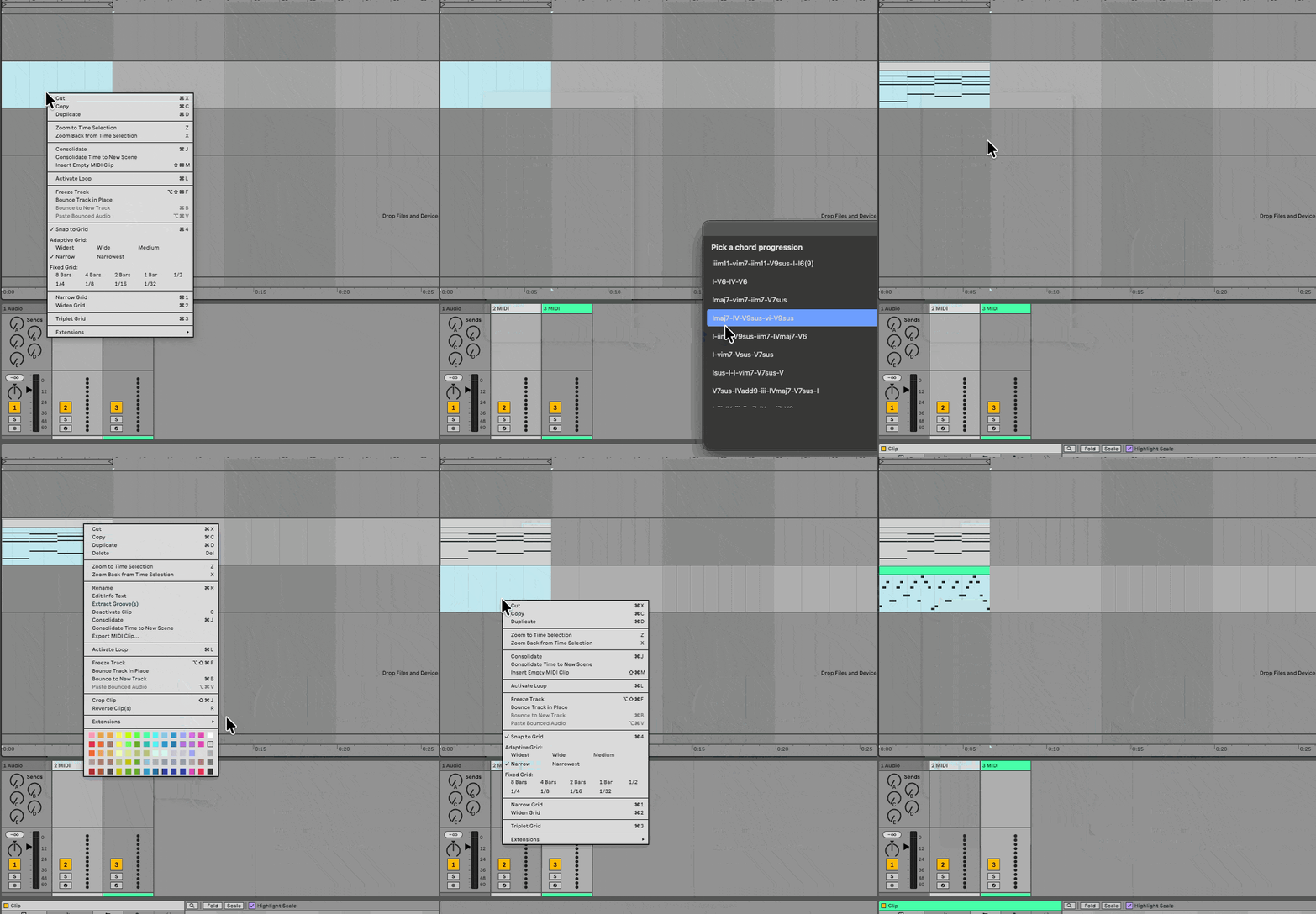
What it does
Insert Chord Progression
Right-click an empty clip slot in Session View, or a time selection on a MIDI track in
Arrangement View → Insert Chord Progression. MIDI Daddy reads Live's current Scale Mode
setting, finds chord progressions in that key/scale from the bundled library, and lets you pick
one from a list (shown by its roman-numeral pattern, e.g. I-V6-IVmaj7-V7sus-vim7-V7sus). The
progression is time-scaled to exactly fill whatever you selected — 1 bar selected compresses the
whole progression into that bar, 16 bars stretches it to fill 16. Nothing selected (an empty
Session View slot) defaults to 8 bars (assumes 4/4 — this beta SDK doesn't expose Live's actual
time signature).
Find Matching Melody Right-click an existing MIDI clip (e.g. one of your chord progressions) → Find Matching Melody. MIDI Daddy finds melodies in the same key/scale and auto-picks the one whose tempo is closest to your project's (notes are beat-relative, so they always play correctly regardless — tempo is only used to pick the best-feeling match). Then right-click a clip slot or an Arrangement selection and choose Paste Matching Melody to drop it in, time-scaled the same way as chord progressions.
If Scale Mode is off in Live, or set to a scale the library doesn't have a folder for, you'll get a small picker to choose the key and scale manually instead.
Requirements
- Ableton Live Suite 12.4.5+ (beta)
- Developer Mode enabled in Live's Settings → Extensions, if running from source
Installing (as a user)
- Build a
.ablxpackage (see Development below), or get one from a release. - In Live, go to Settings → Extensions and drag the
.ablxfile in. - Right-click in Session View, Arrangement View, or on a MIDI clip to find the new actions.
Development
assets/midi-library/ and assets/midi-index.json are gitignored, not part of this repo (the
library is ~19,500 files — not worth carrying in git history). Before building, copy the
reference MIDI library into assets/midi-library/ yourself, then:
npm install          # pulls the Ableton Extensions SDK/CLI from local .tgz files
npm run build-index  # generates assets/midi-index.json from assets/midi-library/
npm test             # run the test suite (pure logic only — no Live required)
npm start            # build + launch Live with the extension loaded (Developer Mode required)
npm run package      # production build + produce a distributable .ablx
Developer Mode (npm start) and an installed .ablx are mutually exclusive — stop the npm start process before testing a packaged build.
Project structure
manifest.json, package.json, build.ts, tsconfig.json   Extension scaffolding
assets/
  midi-library/        The bundled reference library (MIDI CHORDS/, MIDI SCALES/)
  midi-index.json       Generated index over the library (see scripts/build-index.ts)
src/
  extension.ts          Entry point — wires up both actions
  scale.ts               Maps Live's Scale Mode to a library key/scale
  library/                MIDI parsing + the index query layer
  ui/picker.ts            The shared "choose one of these" webview modal
  actions/                The two context-menu actions
scripts/
  build-index.ts          Builds assets/midi-index.json from assets/midi-library/
See CLAUDE.md for architecture notes and gotchas discovered while building this, and
docs/superpowers/ for the original design spec and implementation plan.
Status
v1: both actions are implemented, tested (25 automated tests covering all the pure logic), and confirmed working end-to-end in a real running Ableton Live instance (see the demo above).
Roadmap
- A browsable library webview (search/filter/preview before inserting), rather than only the current "right-click → small list" flow
- A custom chord-progression builder from individual chords/triads (the bundled but
currently-unused
assets/midi-library/MIDI CHORDS/data is reserved for this) - Drum MIDI
Rate this extension
One rating per account; you can change it any time.
Comments
No comments yet.