AKStretch
v1.0.0Ableton Live extension — cyclic OLA time stretch
 Huey Peard
README · rendered from GitHubView source
AKStretch
An Ableton Live extension that time-stretches audio clips using a cyclic overlap-add algorithm. Built with the Ableton Extensions SDK.
Features
- Cyclic OLA time stretch with configurable grain size
- Varispeed (pitch-correct) mode toggle
- Right-click an arrangement selection or an individual audio clip to stretch
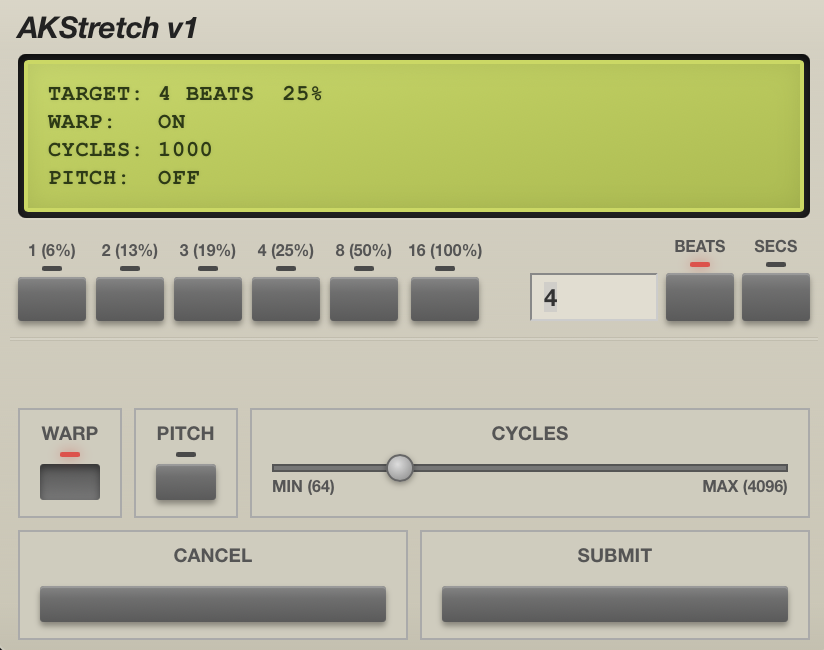
- Hardware-inspired duration picker with dot-matrix LCD display
Installation
- Download the latest
AKStretch-x.x.x.ablxfrom the Releases page - Open Ableton Live → Preferences → Extensions
- Drag and drop the
.ablxfile onto the Extensions page
Requires the Ableton Live beta build that supports Extensions.
Usage
From a time selection:
- In the Arrangement view, drag a time selection across the region you want to stretch
- Right-click on the selection → AKStretch: Fit to Selection
- The clip is stretched to fill the selected duration
From a clip:
- Right-click any audio clip → AKStretch: Choose Duration
- Enter the target duration in beats or seconds
- Adjust cycles and pitch-correct settings, then submit
Settings
| Setting | Description |
|---|---|
| Duration (beats) | Target length in beats |
| Duration (seconds) | Target length in seconds |
| Cycles | Grain size for the OLA algorithm (64–4096) |
| Pitch Correct | Toggles between cyclic OLA and varispeed stretching |
Limitations
- Session view clips are not currently supported — use Arrangement view only
Development
Prerequisites
- Node.js
- The Ableton Extensions SDK (available to beta testers via Ableton's Centercode program)
Setup
pnpm install
Scripts
pnpm start            # build (dev) + load into Live via Developer Mode
pnpm run build        # dev build
pnpm run build:production  # production bundle
pnpm run package      # production build + produce a .ablx
License
MIT
Rate this extension
One rating per account; you can change it any time.
No ratings yet — be the first
Comments
No comments yet.