Composition Aide
v0.2.0A music theory extension for Ableton Live built on the Ableton Extensions SDK (1.0.0-beta.0). Composition Aide adds harmonic intelligence directly into Live's context menus: generate voiced progressions from templates or typed Roman numerals, apply comping rhythms, generate bass…
 saarsena
Composition Aide
A music theory extension for Ableton Live built on the Ableton Extensions SDK (1.0.0-beta.0). Composition Aide adds harmonic intelligence directly into Live's context menus: generate voiced progressions from templates or typed Roman numerals, apply comping rhythms, generate bass lines that follow your chords, compose whole song forms as session scenes, analyze harmony with one-click substitutions, explore modes, find compatible clips, and get a per-chord improv guide with upper structure triads and frequency references for spectral work. Chords are audible everywhere you choose them, courtesy of a built-in preview synth.
All theory operations are handled by a local Python engine that ships inside the extension and runs as a subprocess alongside Live. No cloud, no latency, no pip installs.
Requirements
| Ableton Live | A Live build with the Extensions platform (currently in closed beta via Centercode). Regular Live releases do not include the Extension Host. Not in the beta yet? Ask in the Ableton Discord #extensions channel. |
| Python 3.9+ | The theory engine is pure Python standard library, no packages to install. See per-OS notes below. |
That's it for regular use. Node.js is only needed if you're building from source.
Install (the easy way)
- Download
Composition-Aide-x.y.z.ablxfrom the Releases page. - Open Live, go to Settings → Extensions, and drop the
.ablxfile onto that page. - Make sure Python 3 is available (one-time check, see below).
- Right-click a MIDI clip, clip slot, or scene. The Composition Aide commands appear in the context menu.
Python check: macOS
Open Terminal (Cmd+Space, type "Terminal") and run:
python3 --version
- If it prints a version (3.9 or newer), you're done.
- If macOS pops up a dialog offering to install "command line developer tools", click Install, wait for it to finish (a few minutes, one time only), then restart Live.
- Alternatively, install Python from python.org. The standard installer works fine.
Python check: Windows
Open PowerShell and run:
python --version
If that fails, install Python from python.org and tick "Add Python to PATH" during install (or install Python from the Microsoft Store, which sets up PATH automatically). Then restart Live.
Troubleshooting
- Commands appear but do nothing / dialogs show an engine error: Python isn't on your PATH. Run the version check above in a fresh terminal. If you have Python somewhere unusual, set the
PYTHON_CMDenvironment variable to its full path before launching Live. - Commands don't appear at all: your Live build doesn't include the Extension Host, or the extension didn't install. Check that Settings → Extensions lists Composition Aide.
- It worked, then stopped after a Python update: restart Live so the engine subprocess respawns against the new interpreter.
Features
Features are invoked from Live's context menu. All commands are non-destructive unless noted.
Generate
| Command | Trigger | What it does |
|---|---|---|
| Generate Progression | Right-click MIDI track arrangement selection | Pick key, scale, chord template, voicing, and 7ths toggle, or type your own progression as Roman numerals or chord names (ii7 V7 Imaj7, bVII, V7/ii, Dm7 G7 Cmaj7) with live validation as you type. A Rhythm picker applies comping patterns to the output instead of block chords: Charleston, tresillo, pumping 8ths, offbeat skank, boom-chuck, arpeggio and more, with accents and rests. Writes a fully voiced progression across selected MIDI tracks. |
| Fill Clip with Progression | Right-click MIDI clip | Same dialog as Generate (including custom Roman numeral input), but fills an existing clip rather than creating a new one. |
| Insert Chord | Right-click session clip slot | Opens the Chord Palette: all diatonic chords for Live's current Key/Scale, triads and 7ths tabs, 12 scale types, dynamic grid. Chords sound as you click them (built-in synth, at the selected octave). Pick length, octave, and voicing then click Insert. |
| Generate Bass Line | Right-click MIDI clip | Recognizes the chords in the clip and writes a bass clip that follows them to the first empty MIDI slot. Fifteen patterns across jazz, Latin, and modern styles, in three registers: held roots, root-fifth, quarter pulse, pumping 8ths, octave 8ths, two-feel, walking, boogie shuffle, bossa nova, tumbao (with the ponche anticipating the next chord), tresillo, reggaeton, offbeat skank, funk 16ths, and pedal + pickup. Walking, two-feel, and pedal patterns approach each chord change chromatically. |
| Compose Song Form | Right-click scene | Full song-structure workbench: build a list of sections (Verse, Chorus, Bridge and so on), each with its own bars, key/scale, progression (template or custom Roman numerals), rhythm pattern, and bass pattern. Writes one new scene per section below the clicked scene, with a chord clip and optional bass clip colored by key, so launching scenes top-to-bottom performs the song. Ships with form presets: Verse-Chorus, AABA, 12-bar blues, EDM arc, lo-fi vamp set. |
Explore
| Command | Trigger | What it does |
|---|---|---|
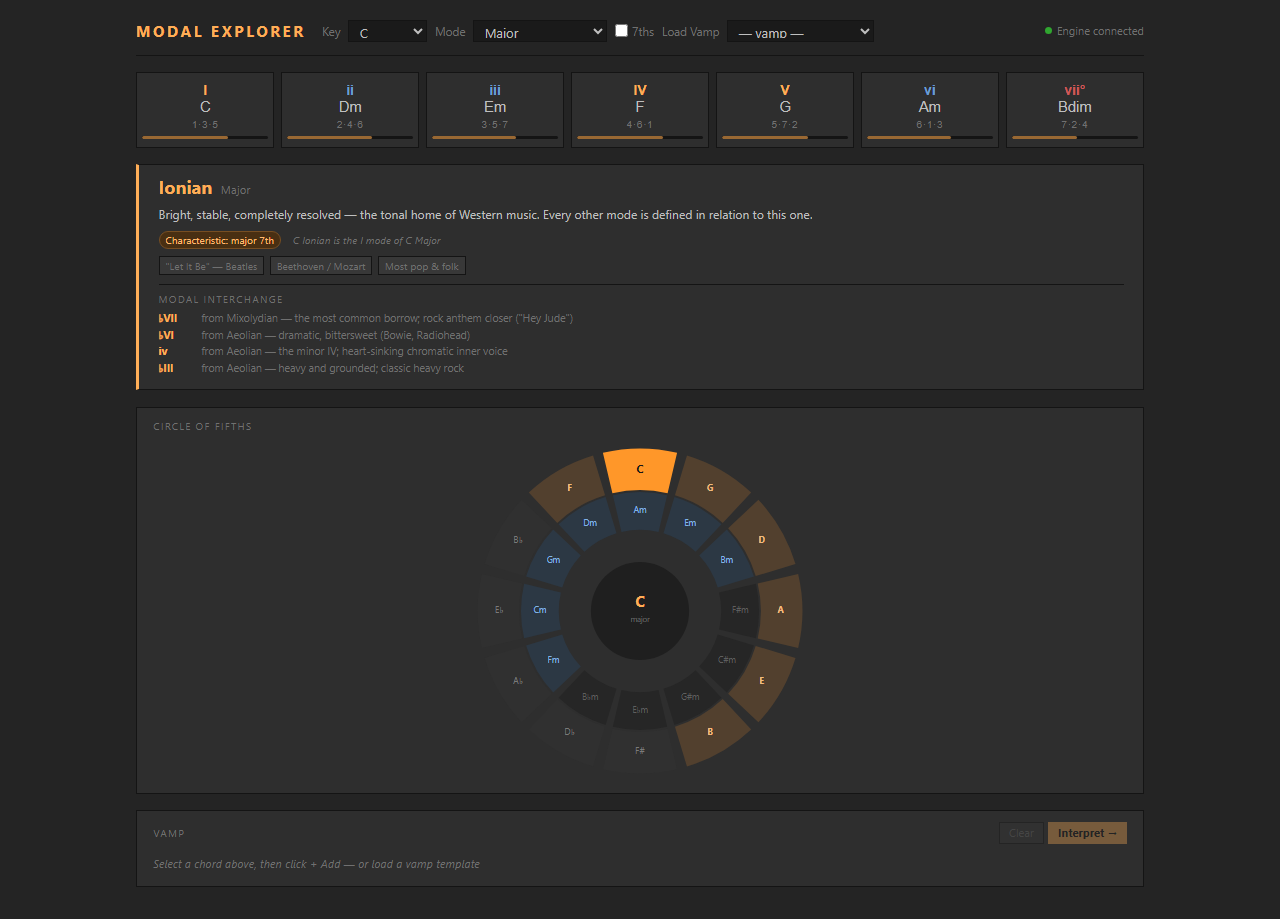
| Modal Explorer | Right-click session clip slot | Full browser-based theory workbench. Chord grid, Circle of Fifths, progression builder with drag-to-reorder, auto-analysis, 12 template presets, and a mode card for every scale, with Modal Interchange suggestions showing borrowed chords and their character. Chords sound on click and the vamp has a ▶ Play button (built-in synth; Web MIDI output still supported when a port is selected). Defaults to Live's current key on open. In session view, a Write to Clip button writes the voiced progression directly into the slot. |
Analyze
| Command | Trigger | What it does |
|---|---|---|
| Analyze Harmony | Right-click MIDI clip | Recognizes chords, infers key, shows Roman numerals with tension indicators, and suggests substitutions you can apply in one click. Everything is audible: click any chord box to hear it, play the whole progression in its actual clip timing, audition each substitution as original-then-replacement before applying, and click Upper Structure cards to hear the triad over the chord root. Includes a Solo Map (see below) for every chord in the progression. |
| Find Compatible Clips | Right-click MIDI clip | Scans the entire session for clips in harmonically related keys (same, relative, dominant, subdominant, parallel). Shows compatibility relationships with circle-of-fifths color swatches. Also generates ready-made progressions in related keys; click Write → on any suggestion to write it as a new MIDI clip into the first empty slot. |
| Map Session Keys | Right-click scene | Scans all MIDI clips and shows a color-coded key grid (tracks × scenes). Mismatched clips are outlined. Useful before a live set to audit harmonic consistency. |
Transform
| Command | Trigger | What it does |
|---|---|---|
| Optimize Voice Leading | Right-click MIDI clip | Re-voices all chords in the clip using smooth voice leading (minimal pitch movement). Preserves durations, velocities, and non-chord notes. |
| Snap to Key | Right-click MIDI clip | Infers the clip's key, removes out-of-key notes. Uses a pitch-class histogram fallback for purely melodic clips. |
| Snap to Scale | Right-click MIDI clip | Snaps note pitches to any of 12 named scales, a gentler alternative to Snap to Key that moves notes to the nearest scale degree rather than deleting them. |
| Transpose Selected Clips | Right-click multi-selected clip slots | Semitone picker (−24 to +24) with one-click presets. Shifts all notes in every selected clip. |
| Transpose Session | Right-click scene | Transposes all MIDI clips in the session by a chosen interval, with an option to re-color clips by the new keys. |
Label & Color
| Command | Trigger | What it does |
|---|---|---|
| Color Clips by Key | Right-click scene | Writes clip.color on every MIDI clip using the circle-of-fifths color system. Bakes a key map into session view, no modal needed. |
| Label Clip Key | Right-click MIDI clip | Appends the inferred key to the clip name, e.g. "Loop 1 [Am]". |
| Label All Clip Keys | Right-click scene | Same as Label Clip Key but applied to every MIDI clip in the session in one pass. |
Solo Map
When you run Analyze Harmony, every chord in the progression gets a Solo Map entry showing:
- Scale/mode recommendation with a one-line rationale
- Chord tones with exact frequencies in Hz (octave 4, close position above the root)
- Lean on: the characteristic interval for that mode, also in Hz
For dominant 7th chords, the Solo Map expands with an Upper Structures section: four major triads you can superimpose over the dominant for different harmonic colors. Click any card to hear it.
| UST | Sound | Extensions |
|---|---|---|
| II | Lydian dominant | 9 · #11 · 13 |
| ♭V | Altered dominant | ♭5 · 7 · ♭9 |
| ♭II | Phrygian dominant | ♭9 · 11 · ♭13 |
| ♭VI | Dark altered | ♭13 · R · ♭9 |
Each upper structure triad shows its three note names and Hz values, useful as frequency targets for spectral synthesis, additive patches, or harmonic effects in Max/MSP or similar environments.
Building from source
Only needed if you want to hack on the extension. If you just want to use it, install the .ablx instead.
Prerequisites
- Everything from Requirements above
- Node.js ≥ 24.14.1: check with
node --version, download from nodejs.org - The Extensions SDK zip from Centercode (you need the two
.tgzpackages inside it) - Developer Mode enabled in Live: Settings → Extensions → Developer Mode (required for
npm startto connect)
Step 1: Get the repo
git clone https://github.com/saarsena/modal_explorer
cd modal_explorer
Step 2: Install dependencies
npm install needs the two SDK packages that came with your Centercode download. When you extracted the SDK zip, they're sitting in the root of that folder:
extensions-sdk-1.0.0-beta.0/        ← the folder you extracted from Centercode
  ableton-extensions-sdk-1.0.0-beta.0.tgz
  ableton-extensions-cli-1.0.0-beta.0.tgz
  ...
Copy both .tgz files into the repo folder (next to package.json), then open package.json and point the two file references at them:
"@ableton-extensions/sdk": "file:./ableton-extensions-sdk-1.0.0-beta.0.tgz",
"@ableton-extensions/cli": "file:./ableton-extensions-cli-1.0.0-beta.0.tgz"
Then run:
npm install
Step 3: Tell the runner where Live is
ExtensionHostNodeModule.node is a file that ships inside Ableton Live (not the SDK). The path depends on your OS:
- Windows:
C:\ProgramData\Ableton\Live 12 Beta\Program\ExtensionHost\ExtensionHostNodeModule.node - Mac: inside the Live app bundle, typically
/Applications/Ableton Live 12 Beta.app/Contents/Frameworks/ExtensionHostNodeModule.node. If you're unsure, runfind /Applications -name "ExtensionHostNodeModule.node"in Terminal.
Copy the example config file and set that path:
# Mac / Linux
cp .env.example .env

# Windows (PowerShell)
Copy-Item .env.example .env
Open .env and set EXTENSION_HOST_PATH:
# Windows example
EXTENSION_HOST_PATH=C:\ProgramData\Ableton\Live 12 Beta\Program\ExtensionHost\ExtensionHostNodeModule.node

# Mac example
EXTENSION_HOST_PATH=/Applications/Ableton Live 12 Beta.app/Contents/Frameworks/ExtensionHostNodeModule.node
Step 4: Run it
Make sure Live is open and Developer Mode is on, then from the repo folder:
npm start
This builds the extension and loads it into Live. You'll see the Composition Aide commands appear in Live's context menus.
Stuck? The most common issues: (1) wrong
EXTENSION_HOST_PATH, so double-check the path exists and you saved.envnot.env.example; (2) Developer Mode is off, check Settings → Extensions; (3) Node.js version too old,node --versionshould be ≥ 24.14.1.
FYI: While the extension is running, you can open
src/theory-machine.htmldirectly in your browser. It connects to the local theory engine automatically and works as a full standalone web app. Nice to have open on a second screen while you work in Live.
Scripts
| Script | What it does |
|---|---|
npm run build | Type-check + bundle → dist/extension.js (dev: sourcemaps, unminified) |
npm start | Build + launch in Live's Extension Host |
npm run package | Production build + create the distributable .ablx (includes the engine/ Python files) |
npm run package writes Composition-Aide-<version>.ablx to the repo root. That's the file to share. The version comes from manifest.json.
Environment overrides
| Variable | Default | Purpose |
|---|---|---|
COMPOSITION_AIDE_PATH | engine/ (bundled) | Point the extension at a different Python engine directory during development |
PYTHON_CMD | python3 (Mac/Linux), python (Windows) | Use a specific Python interpreter or full path |
The Python Engine
The engine/ directory contains the full theory engine: pure Python stdlib, no pip dependencies. It is bundled into the .ablx, runs as a persistent subprocess alongside Live, and handles all music theory computations over a newline-delimited JSON-RPC protocol on stdin/stdout.
Files:
| File | Purpose |
|---|---|
chordgen/server.py | JSON-RPC server, spawned by the extension |
chordgen/__init__.py | Public API surface for the server |
music_theory.py | Core primitives: notes, intervals, scales, chords |
analyzer.py | Key inference, Roman numeral analysis, substitution suggestions |
voicing.py | Close, drop2, shell, and smooth voice-leading strategies |
songform.py | Chord template expansion (I-V-vi-IV, 12-bar blues, etc.) |
upper_structures.py | Upper structure triad logic |
Operations used by the extension:
op_progression: generate chord progressions from key/scale/templateop_voice_progression: voice a chord list with close, drop2, or smooth strategyop_recognize_chord: identify a chord from a set of MIDI pitch classesop_analyze: infer key, compute Roman numerals, suggest substitutionsop_diatonic: all diatonic chords for a given key and scaleop_parse_roman/op_parse_chord: resolve Roman numerals and chord names for the custom progression inputop_voicings: close/drop2/shell voicing for a named chord
Architecture
Ableton Live
  └── Extension Host (Node.js)
        ├── extension.ts      17 commands + context menu registrations
        ├── engine.ts         ChordgenEngine: subprocess JSON-RPC client
        └── src/*.html        self-contained modal dialogs, bundled as strings
              │
              └──send()──▶  chordgen/server.py  (Python, stdin/stdout JSON-RPC)
                                  └── music theory ops
engine.ts spawns the Python process on first use, keeps it alive for the session, and multiplexes concurrent requests by id, so Promise.all across multiple engine.send() calls is safe.
Each HTML modal is a fully self-contained file bundled into dist/extension.js at build time. Data is injected via .replace("__TOKEN__", safeJson(data)) before the data:text/html,… URL is passed to showModalDialog. Results come back as JSON via closeWithResult(result). The engine also serves the same operations over HTTP on 127.0.0.1:7842, which the modals use for live input validation and audible previews.
Color System
Keys are colored by circle-of-fifths position:
C  = 0°    G  = 30°   D  = 60°   A  = 90°
E  = 120°  B  = 150°  F# = 180°  D♭ = 210°
A♭ = 240°  E♭ = 270°  B♭ = 300°  F  = 330°
Major keys: saturation 70%, lightness 45%.
Minor keys: saturation 55%, lightness 35% (darker).
Packed as 0x00RRGGBB integers for clip.color.
License
MIT © 2026 saarsena
Rate this extension
One rating per account; you can change it any time.
Comments
No comments yet.