Cue Templates
v0.1.0Ableton Live Extension — drop genre-specific cue point templates. 33 templates, 6 families.
 Joe Murphy
 README · rendered from GitHubView source
Ableton Cue Templates
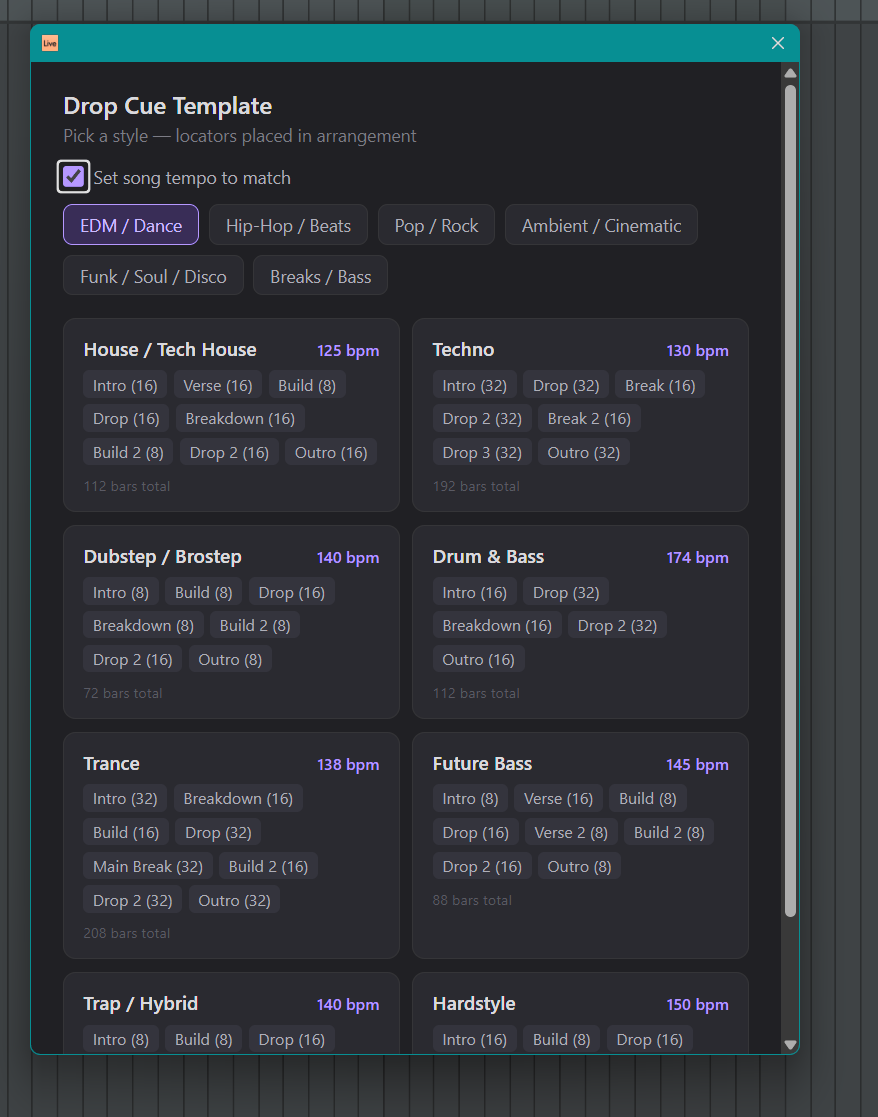
Ableton Live 12 Extension — right-click any track header to drop genre-specific cue point templates into the arrangement, or clear all locators instantly.
Features
- 33 templates across 6 genre families
- Radio button picker — EDM, Hip-Hop, Pop/Rock, Ambient/Cinematic, Funk/Soul/Disco, Breaks/Bass
- Optional tempo override — checkbox sets the song BPM to match the genre
- Clear All Locators — second menu item, one-click wipe
- Bar counts on every section — see exactly how long each part is before you drop
Install
Drag cue-templates.ablx onto Ableton Live 12 Beta.
Developer Mode is only needed when building from source — turn it off for normal use.
Usage
- Right-click any MIDI or Audio track header
- Choose Drop Cue Template… → pick a genre family → select a template
- Optionally tick Set song tempo to match to change BPM
- To wipe all locators: right-click → Clear All Locators
Build from source
npm install
npm run build       # tsc + esbuild
npm run package     # creates .ablx
Requires the Ableton Extensions SDK v1.0.0-beta.0 (Centercode beta program).
See also
- ableton-scene-send — right-click a Scene row to copy all clips into Arrangement at your locators. The two extensions work together: cue-templates drops the locators, scene-send places the clips.
License
MIT
Rate this extension
One rating per account; you can change it any time.
No ratings yet — be the first
Comments
No comments yet.