Loooprr
v1.0.2Slice & shuffle your Live Set's own audio into new tempo-synced glitch loops. Ableton Live 12 Extension by Paul Petrol — grid-locked chops, 11 FX under one density knob, savable recipes.
 tom-lejeune
LOOOPRR 🎲
GET TO THE CHOPPER!
Slice & shuffle the audio already in your Live Set into brand-new, tempo-synced glitch loops. An Ableton Live 12 Extension by Paul Petrol.



What it does
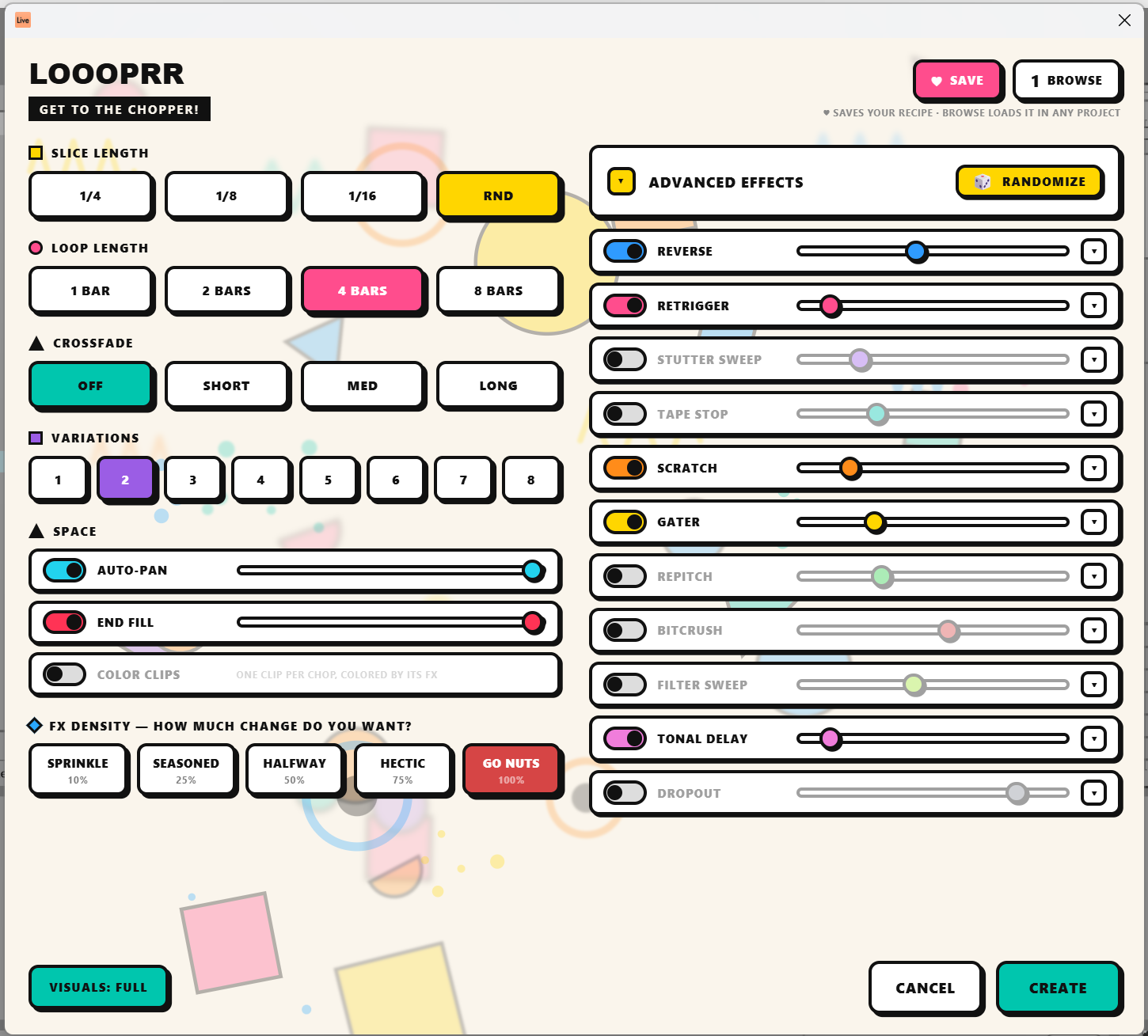
Select a time range across one or more audio tracks in the Arrangement, right-click → Create Random Loop…, hit CREATE — and Loooprr renders your selection, chops it into grid-locked slices, shuffles them into new loops, and drops them as warped, looping clips on a fresh track. Your source audio is never touched, and everything is one Ctrl+Z away from gone.
The chops always land on the grid — slices are exact 1/4, 1/8 or 1/16 fractions of your selection, cut and placed on the beat — so the groove survives the shuffle. This is a collage, not a blender.
The FX
Every chop can get one effect, drawn from the rack:
| 🔵 Reverse — full, half, or ping-pong | 🩷 Retrigger — stutter-repeat | 🟣 Stutter sweep — grid-locked repeats gliding in pitch |
| 🩵 Tape stop — fast / med / slow brake | 🟠 Scratch — vinyl scrub & spinback | 🟡 Gater — 2/3ᵀ/4/6ᵀ/8 gates, triplet feels |
| 🟢 Repitch — octave up or down | 🔴 Bitcrush — light to hard | 🍏 Filter sweep — gliding LP/HP with depth |
| 🎀 Tonal delay — pitched ring with motion LFO | ⚪ Dropout — holes: full, half, or fade |
FX DENSITY is the one knob that rules them all — how much change do you want? From SPRINKLE (10% of chops) to GO NUTS (every single one). The weight sliders in the EFFECTS rack simply divide that budget (they always sum to 100% — push one up and the others give way), so a loop can mathematically never oversaturate. Feeling lucky? The 🎲 RANDOMIZE rerolls the whole rack. Want none of it? Flip the EFFECTS master switch off and Loooprr is a pure chopper — just slicing and rearranging.
On top: AUTO-PAN (alternating chops left/right), END FILL (the last beat becomes an accelerating snare-roll), and COLOR CLIPS — place one clip per chop, colored by the effect that hit it, so you can see your loop's structure right in the Arrangement.
Favorites
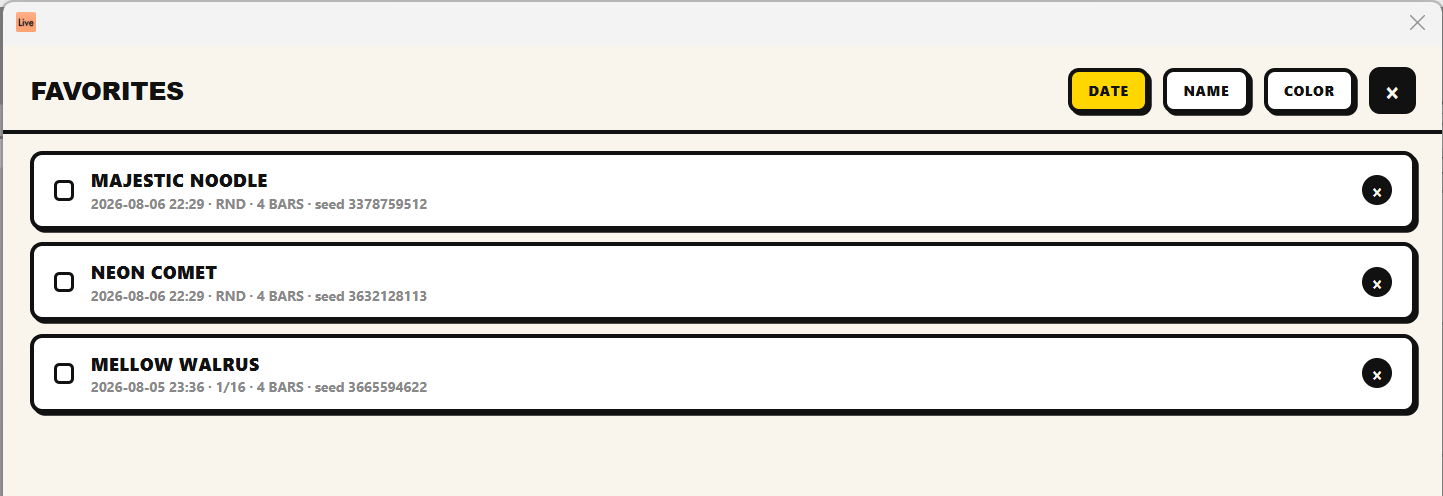
Dialed in something you love? ♥ SAVE stores the whole recipe — every setting and the exact shuffle — under a name like DISCO WALRUS or MAJESTIC NOODLE. Load it in any other project and get the exact same chops on brand new material. Sort by date, name or color tag; right-click to rename, recolor or delete.
Install
- Download
Loooprr-x.y.z.ablxfrom the latest release. - Drag it into Live → Settings → Extensions.
- Restart Live.
- Select audio in the Arrangement → right-click → Create Random Loop…
Requires Ableton Live 12 Suite Beta 12.4.5+ (Extensions don't exist in the stable release yet).
Build from source
The Ableton Extensions SDK may not be redistributed, so bring your own
tarballs from the Extensions beta and drop them in ./sdk/:
sdk/ableton-extensions-sdk-1.0.0-beta.0.tgz
sdk/ableton-extensions-cli-1.0.0-beta.0.tgz
Then, with Node ≥ 24.14:
npm install        # resolves the SDK/CLI from ./sdk/*.tgz
npm test           # offline DSP unit tests (no Live needed)
npm run package    # type-check + bundle + .ablx
The DSP is pure, dependency-free TypeScript — fully deterministic (a saved recipe always renders the same loops), unit-tested offline, output rendered as 48 kHz / 24-bit WAV.
Nice touches
- Every adjustment quietly deals a fresh shuffle, so each tweak is a genuinely new roll — while reopening the dialog keeps your last recipe, so the loop you just made can be reopened and ♥ saved exactly as it sounded.
- The chops never touch your source audio: results land on a new track, and one undo removes everything.
- The dialog sizes itself to your screen. Weak machine? VISUALS: ECO switches off the interface eye-candy.
License
MIT © 2026 Paul Petrol. The Ableton Extensions SDK itself is proprietary and not part of this repository.
Rate this extension
One rating per account; you can change it any time.
Comments
No comments yet.