Noise Canvas
v1.0.3Photoshop for sound
 Rob Clouth5.0 (1)Rated 5.0 out of 5 from 1 ratings
Noise Canvas
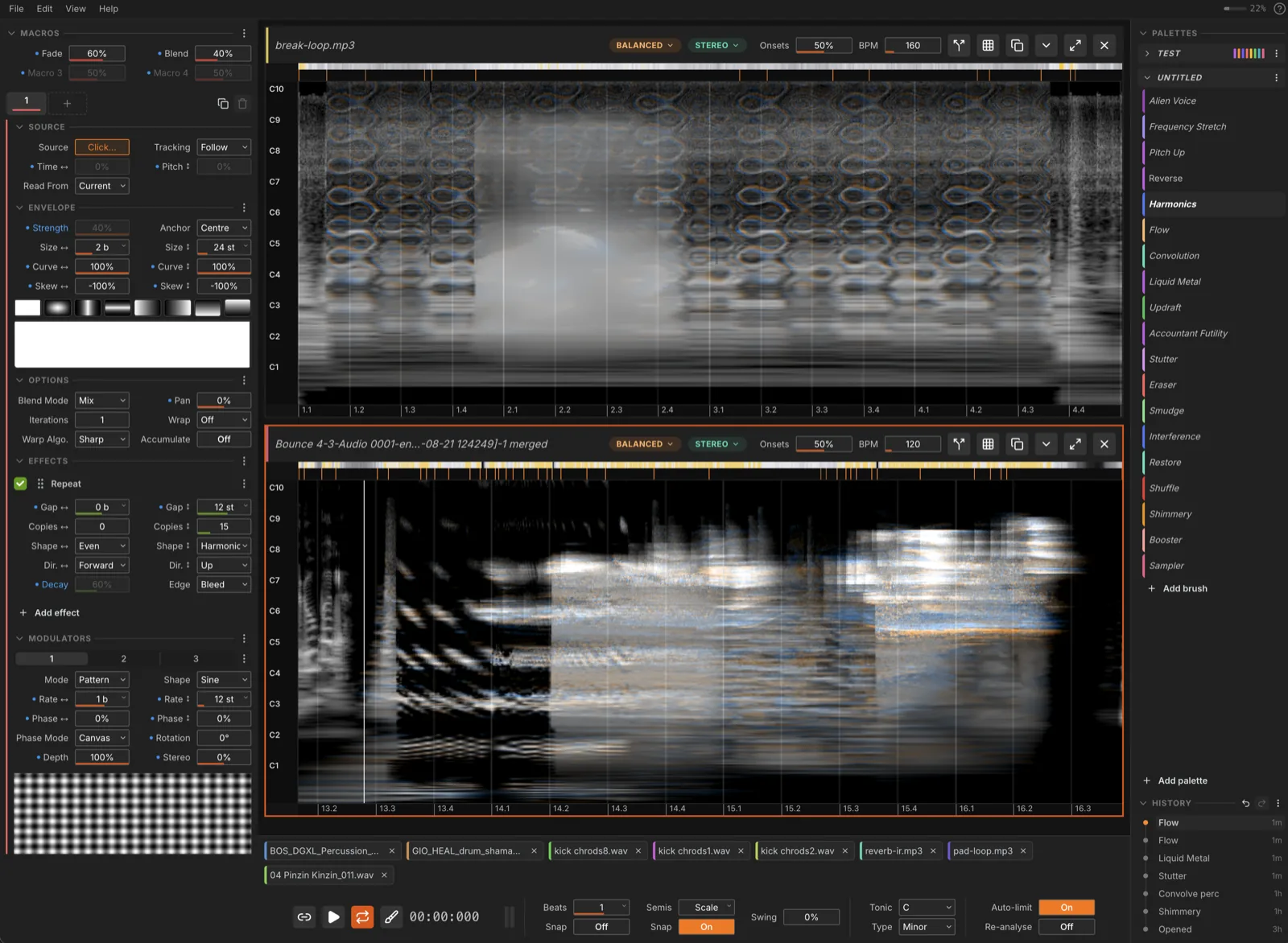
Noise Canvas is a tool for doing spectral sound design. It loads audio files, shows them as spectrograms, and lets you paint transformations and effects directly onto the sound in beats and semitones. It's building upon the shoulders of projects like Metasynth, but with proper phase handling, more modern UI, better DAW integration etc. The whole thing is painting-coded: you have brushes, palettes, strokes etc. I designed it to feel like a canvas into which you're dabbing splotches of colour. And it has pen tablet support so you can sketch with a stylus. You can get pretty interesting sounds with it.
Download
| Your computer | Get it |
|---|---|
| Mac, Apple Silicon (M1 or newer) | Download .dmg |
| Mac, Intel | Download .dmg |
| Windows 10 or 11 | Download the installer |
| Linux | Download .AppImage or .deb |
| Ableton Live 12 extension (beta) | Download .ablx |
Which macOS? The app needs macOS 12 Monterey or newer. AI stem separation and Generate need more: an Apple Silicon Mac on macOS 14 Sonoma or newer. On an older system or an Intel Mac, everything else works. I've only tested it on Sequoia (15). If it won't run on yours, open an issue and say which version you're on.
It leans on your graphics card. Every effect is a shader, so the GPU does the work rather than the CPU. Integrated graphics are fine, but an older machine will paint slowly on long files, and can run out of GPU memory on very long ones. Shorter files are the fix. I'm currently investigating how to improve performance on older computers.
The green Code button at the top of this page gives you the source code, not the app. Use the table above.
Open the downloaded file to install it. Download and install covers each platform, and the warning Windows shows the first time.
📖 Read the manual →
Or just open it up and play around. All the parameters have got tooltips, there's a walkthrough on first launch, and ? outlines every part of the window at once. I'm of the belief that how to use a tool should be mostly obvious just by using it. If it's not then I probably need to fix something.
Free software
Noise Canvas is free. If I need cash some day I might charge for future versions, but right now I don't, and the people of Gaza do.
If it's worth money to you, please consider giving that money to people working on the ground instead. These organisations deliver medical care, food, and water directly in Gaza and the West Bank:
- Palestine Children's Relief Fund — medical care for injured and sick children
- Medical Aid for Palestinians — emergency medical teams in Gaza
- Anera — food, clean water, and medicine
- Palestine Red Crescent Society — the ambulances and the hospitals
What it does
- Paint on spectrograms. Brushes paint effects across time and pitch, snapped to a musical grid and scale.
- 11 spectral effects — dynamics, transform, blur, repeat, synthesise, evolve, binaural, sort, transmute, convolve, attract — stackable and reorderable, several instances at a time.
- Multi-step brushes with four macros, a preset library, and hotkeys.
- Deep modulation — three per-pixel 2D modulators (patterns, procedural textures, your own images, envelope follower, sequencer), plus macros, pen pressure/tilt, and contextual sources.
- Branching history that survives restarts, with favourites and per-branch audio export.
- Stem splitting — harmonic/percussive, NMF, or AI separation — with lossless merge back.
- Generate. New sound from a text prompt, into a selection or over the whole file: fill a gap from the sound around it, or restyle what is there.
- Slots into any DAW as its external sample editor. Ableton Live goes further: a Live 12 extension embeds the whole editor, and Ableton Link keeps tempo in sync.
Everything runs on the GPU and resynthesises after every stroke, so you hear the real audio immediately.
How it works
Two decisions shape how everything in here sounds.
Phase is not thrown away
A spectrogram you can look at is only magnitude, and tools that edit the picture alone come back sounding smeared and metallic. Every cell here carries magnitude and phase, for left and right, and every effect operates on all of it: transients stay sharp when you move them, stereo placement means something, and what comes out is the audio you edited, not a reconstruction of it.
It's also why every brush has a Warp Algorithm setting: moving sound in time or pitch means choosing its new phase, and the rule that keeps a drum hit punchy is the wrong one for a pad. You get a handful of rules and pick by ear.
Time is beats, pitch is semitones
The analysis is a Constant-Q Transform rather than an FFT, which means the vertical axis is genuinely pitch: a semitone is the same distance anywhere on the canvas, low or high. Constant-Q also trades resolution the way hearing does — accurate pitch down low, accurate timing up top — so transients and harmonics come out sounding natural instead of carrying the usual FFT smear.
Horizontally you're in beats, not seconds. Every file has a tempo, the grid snaps to beat divisions with swing, and pitch snaps to a scale. So a brush that's "one beat wide and an octave tall" stays that regardless of what you load it onto.
Download and install
Take the file for your platform from the Download table, then:
- macOS — open the
.dmgand drag Noise Canvas into Applications. The Mac builds are signed and notarised, so they open with no warning. - Windows — run the installer, and read the next section first.
- Linux — run
chmod +x noise-canvas-linux.AppImageand open it, or install the.debwithsudo dpkg -i noise-canvas-linux.deb.
Every version, with its release notes, is on the releases page.
Open an audio file (or drag one onto the window), paint on its spectrogram, and hear the results instantly.
First time in? First Steps walks you from opening a file to painting a stroke, and the app offers the same tour on first launch.
Supported formats: wav, mp3, ogg, flac, m4a, aac, wma, aiff, ape, wv, mka.
First launch takes a while. Every shader is compiled and warmed before you can paint, with a progress bar. After the first launch it's much faster.
Important: the "scary" warning on Windows
The Windows build is unsigned. A certificate there costs a paid subscription, and for a free app I'm just not going to do that soz. So Windows will complain the first time you open it:
- When you first open the installer or
.exe, Windows will show a warning like "Windows protected your PC" or "Unknown publisher." - Click More Info.
- Then click Run Anyway.
That's it — the app will launch, and Windows will remember your choice for next time.
Don't worry about it. If Noise Canvas does something dodgy you can trash me on instagram. Also the code is visible to all so you can see I'm not doing anything bad.
Updates arrive in the app itself: when a new version is out it offers the download, and installs it when you restart. Check for Updates… in the menu does the same on demand.
In your DAW
As an external sample editor
This works with any DAW that can hand a sample to an external editor:
- Set Noise Canvas as the external sample editor in your DAW's preferences (in Live that's Preferences → File/Folder).
- Right-click a sample → Edit.
- Edit, save, close — your DAW reloads the updated version.
Extras for Ableton Live
Live is what I use, so it gets a couple of things the other DAWs don't:
The Live 12 extension (beta). The whole editor, embedded inside Live. Every release attaches a noise-canvas.ablx alongside the app builds. Install it (Live 12 Suite, with Extensions support), right-click an audio clip → Edit in Noise Canvas, paint, then render straight back into the set as a new clip — no exporting, no file juggling. The history panel also gets Export branch to Live, which drops every state along a branch into the set as separate clips. Still beta, as is Live's extension support itself. The standalone app is the most stable route.
Ableton Link. Enable Link in the transport bar to lock tempo and start/stop to Live, or to anything else Link-enabled on the network. Right-click the Link button for latency compensation.
Full details in the manual; extension build and dev-run instructions in src/extension/README.md.
Technical Overview
- Electron, TypeScript, and React, with Zustand for state and Mantine for UI.
- React Three Fiber / Three.js for rendering: a single shared WebGL canvas hosts a viewport per open file.
- All DSP runs on the GPU as GLSL shaders, ping-ponging between float FBOs. The brush, effect chain, blending, and modulation are all one render graph. Shaders are precompiled and warmed on a worker at startup so the first stroke isn't a freeze.
- Analysis and resynthesis are handled by a native addon around Gaborator, which implements the Constant-Q Transform. The same addon does HPSS, NMF, spectrogram merging, ONNX-based AI separation, and the true-peak limiter.
- Audio decoding via ffmpeg; playback via Tone.js; tempo sync via Ableton Link.
- Complex coefficients are stored as magnitude/phase pairs in RGBA32F textures, phase unwrapped along time per band.
Status
v1.0 is the first release I'd call finished rather than in-progress. It's still a solo project though, so stability is not guaranteed — issues will be tracked and fixed when I can be arsed.
Current tasks, bugs, and ideas live here: https://trello.com/b/P2vcaaZI/noise-canvas
Contributing
Contributions are welcome with caveats. If you want to add features or improvements, reach out first so we can align on direction. You're also free to fork it and take it your own way of course, but it's probably better to see if worth adding to the main fork first.
Building
macOS / Linux
git clone <repo>
cd noise-canvas
npm i
npm run dev
Windows
Install Node.js and make sure native build tools are included. Then open Visual Studio Installer and ensure Windows 11 SDK is selected under Build Tools.
Finally:
npm i
That should work. Probably. God I hate Windows.
Useful scripts
npm run dev            # run the app
npm run build          # typecheck + build
npm run build:mac      # or :win / :linux — packaged distributables
npx node-gyp rebuild   # rebuild the native Gaborator addon after C++ changes

npm run test:run       # renderer / WebGL suite (Vitest + Playwright)
npm run test:addon     # native addon tests
npm run test:host      # extension host tests
npm run test:perf      # painting performance suite
npm run typecheck
npm run lint
Ableton extension
npm run ext:run        # build and launch inside Live (dev)
npm run ext:package    # produces out-ext/noise-canvas.ablx
Related Projects
Other tools that treat sound as something you can look at and draw on.
Credits
- 3dtextures.me – for the textures
- Gaborator – for spectral analysis
- htdemucs – for AI stem separation (CC-BY-NC 4.0)
- Stable Audio 3 Medium by Stability AI – for Generate (Stability AI Community License; its T5Gemma text encoder under the Gemma Terms of Use)
- Tomas Boroski – for the amazing icon (github, instagram)
License
Noise Canvas uses the GNU Affero General Public License v3 (AGPL-3.0). See LICENSE.md for the full text.
This program is free software: you can redistribute it and/or modify it under the terms of the GNU Affero General Public License as published by the Free Software Foundation, either version 3 of the License, or (at your option) any later version.
This program is distributed in the hope that it will be useful, but without any warranty; without even the implied warranty of merchantability or fitness for a particular purpose.
In short: You can use, study, share, and modify this software freely. If you distribute it or run it publicly, you must share your source under the same license. Nobody can sell you a locked-down copy: anyone who charges for this must hand over the source and these same rights, so a paid copy can always be shared on for free.
© 2026 Rob Clouth
Rate this extension
One rating per account; you can change it any time.
Comments
No comments yet.