Notes Mill
v1.0.0Notes Mill is a utility extension for Ableton Live that provides a collection of MIDI clip processing tools for refining rough performances into clean, production-ready MIDI.
 shimarisu_121—No ratings yet
Notes Mill
Notes Mill is a utility extension for Ableton Live that provides a collection of MIDI clip processing tools for refining rough performances into clean, production-ready MIDI. It focuses primarily on processing performances recorded in real time. All commands are accessible via the right-click context menu on any MIDI clip.
Commands
| Command | UI | Description | Notes |
|---|---|---|---|
| Remove Ghost Notes... | 🖥️ | Delete notes that fall below a threshold, selectable by three modes: note grid length (1 to 1/128, including triplets), absolute time in beats, or velocity | Useful for cleaning up micro-notes from sloppy recording or generative tools. Time mode is grid-independent, making it handy when the clip tempo doesn't match the grid. |
| Normalize Length & Velocity... | 🖥️ | Set note lengths to a fixed grid value and/or normalize velocities (Fixed / Average / Offset / Range) | Length and velocity normalization can be applied independently or together. Range mode clamps velocities between a min and max — great for evening out dynamics without flattening them entirely. Offset mode shifts all velocities by a fixed amount with a delta-highlighted slider. |
| Transpose... | 🖥️ | Shift all notes by ±36 semitones via slider or quick buttons (±1, ±12) | The slider highlights the delta from zero in yellow so the shift amount is immediately visible. Pitches are clamped to the valid MIDI range (0–127). |
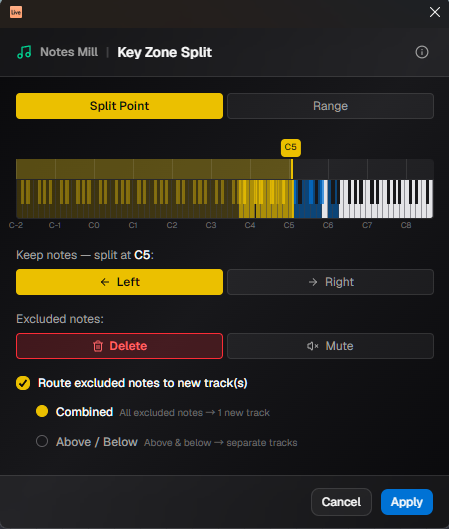
| Key Zone Split... | 🖥️ | Keep notes on one side of a split point (default) or within a pitch range; delete or mute excluded notes, with optional routing to new tracks | Split Point mode keeps Left (≤) or Right (>) of a chosen note. Range mode defines a keep zone with two handles. Route mode sends excluded notes to a new track — Combined: one track, Above / Below: two tracks. |
| Split Clip... | 🖥️ | Split a MIDI clip into segments and place them on a single new track | Choose Equal Parts for an exact count, or By Length to split at fixed musical intervals (bars + note value). The original clip is left untouched. The last segment may be shorter if the clip doesn't divide evenly. Useful for breaking a long recorded improvisation into manageable sections, or for distributing a looped pattern across multiple tracks for independent variation. |
| Muted Notes... | 🖥️ | Unmute all / toggle mute / delete muted / move muted notes to a new track | Move to New Track extracts muted "sketch" notes into their own track without losing them. Toggle Mute is handy for auditioning alternate parts. |
| Remove Overlap | ➖ | Trim note durations so no two notes overlap in time | Essential before sending clips to monophonic synths or samplers. Notes sharing the same start time (chords) are trimmed together, none are deleted. |
| Shift Notes to Start | ➖ | Move the earliest note to beat 0, shifting all other notes accordingly | Fixes clips recorded with a pickup beat or silence at the top, so the clip starts exactly on the first note. |
| Dehumanize Notes | ➖ | Snap all note start times to the nearest 1/32 grid and durations to the nearest standard note length (whole to 1/32) | Unlike Live's built-in quantize, this targets the closest grid value rather than a fixed subdivision — a note near a 1/8 snaps to 1/8, while a note near a 1/16 snaps to 1/16. Effectively removes the subtle timing and length variation introduced by humanization or live playing, producing a perfectly mechanical result. Applies automatically without a dialog. |
🖥️ Opens a dialog UI ➖ Applies immediately without a dialog
Requirements
- Ableton Live with Extensions support
- Ableton Extensions SDK
1.0.0-beta - Node.js
>=24.14.1
Development
Setup
[!NOTE] As of June 2026, enrollment in Ableton's public beta program and a configured SDK development environment are required.
Place the vendor packages in vendor/:
vendor/
  ableton-extensions-sdk-1.0.0-beta.0.tgz
  ableton-extensions-cli-1.0.0-beta.0.tgz
Then install dependencies and generate the HTML files:
npm install
npm run gen:html
[!TIP]
ui/index.htmlandui/interface.htmlare not committed to the repository and must be generated from the template before starting development. They are also regenerated automatically bynpm start,npm run dev:ui, andnpm run build.
Scripts
| Command | Description |
|---|---|
npm start | Generate HTML, build extension, start Vite dev server + Extension Host |
npm run dev:ui | Start Vite dev server only (UI development) |
npm run build | Production build (Vite + esbuild) |
npm run build:dev | Dev build with sourcemaps |
npm run package | Production build + create .ablx archive |
npm run gen:html | Regenerate ui/index.html and ui/interface.html from template |
npm run check | Run Biome lint + format check |
npm run format | Auto-format all files with Biome |
npm test | Run tests in watch mode (Vitest) |
npm run test:run | Run tests once |
npm run clean | Delete dist/ and *.ablx |
npm run clean:all | Delete dist/, *.ablx, and node_modules/ |
Project Structure
src/
  extension.ts          # Extension entry point — registers all commands
  commands/             # One file per dialog command
  lib/
    command/            # registerMidiCommand helper
    dialog/             # Dialog builder (Extension side)
lib/                    # Shared pure logic (used by both src/ and ui/)
  ghost-notes.ts
  key-zone-split.ts
  muted-notes.ts
  normalize.ts
  note-durations.ts
  overlap.ts
  quantize.ts
  split-clip.ts
  transpose.ts
  __tests__/            # Vitest unit tests for lib/
ui/
  App.tsx               # Root component + command routing
  command-meta.ts       # Labels, descriptions, and tips shown in the dialog header
  components/
    AppHeader.tsx
    duration-grid/      # Reusable note duration picker
    key-zone-split/     # Piano range selector + Key Zone Split dialog
    muted-notes/
    normalize/
    remove-ghost-notes/
    split-clip/
    transpose/
    ui/                 # Shared primitives (shadcn/ui + custom)
  lib/
    dialog/             # Dialog helpers (UI side)
  __tests__/            # Vitest component tests for ui/
templates/
  dialog.html.tpl       # HTML template source
scripts/
  gen-html.ts           # Generates ui/index.html and ui/interface.html
Tech Stack
- Ableton Extensions SDK
- React + TypeScript
- Vite + vite-plugin-singlefile
- Tailwind CSS v4
- shadcn/ui
- Biome
- Vitest
Disclaimer
The source code is released under the MIT License. Use at your own risk.
When using the Ableton Extensions SDK, please comply with the license terms as stated by Ableton.
This is a personal project developed in my spare time. All feedback is welcome, but I may not be able to respond to every request. Thank you for your understanding.
Rate this extension
One rating per account; you can change it any time.
Comments
No comments yet.