Project Snapshot
v1.0.0📸 Ableton Live extension that generates interactive HTML reports of your Live Set — now with AI-powered creative suggestions via Cloudflare Workers AI.
 Douglas Fugazi—No ratings yet
📸 Project Snapshot — Ableton Live Extension
Never lose context of your music projects again.
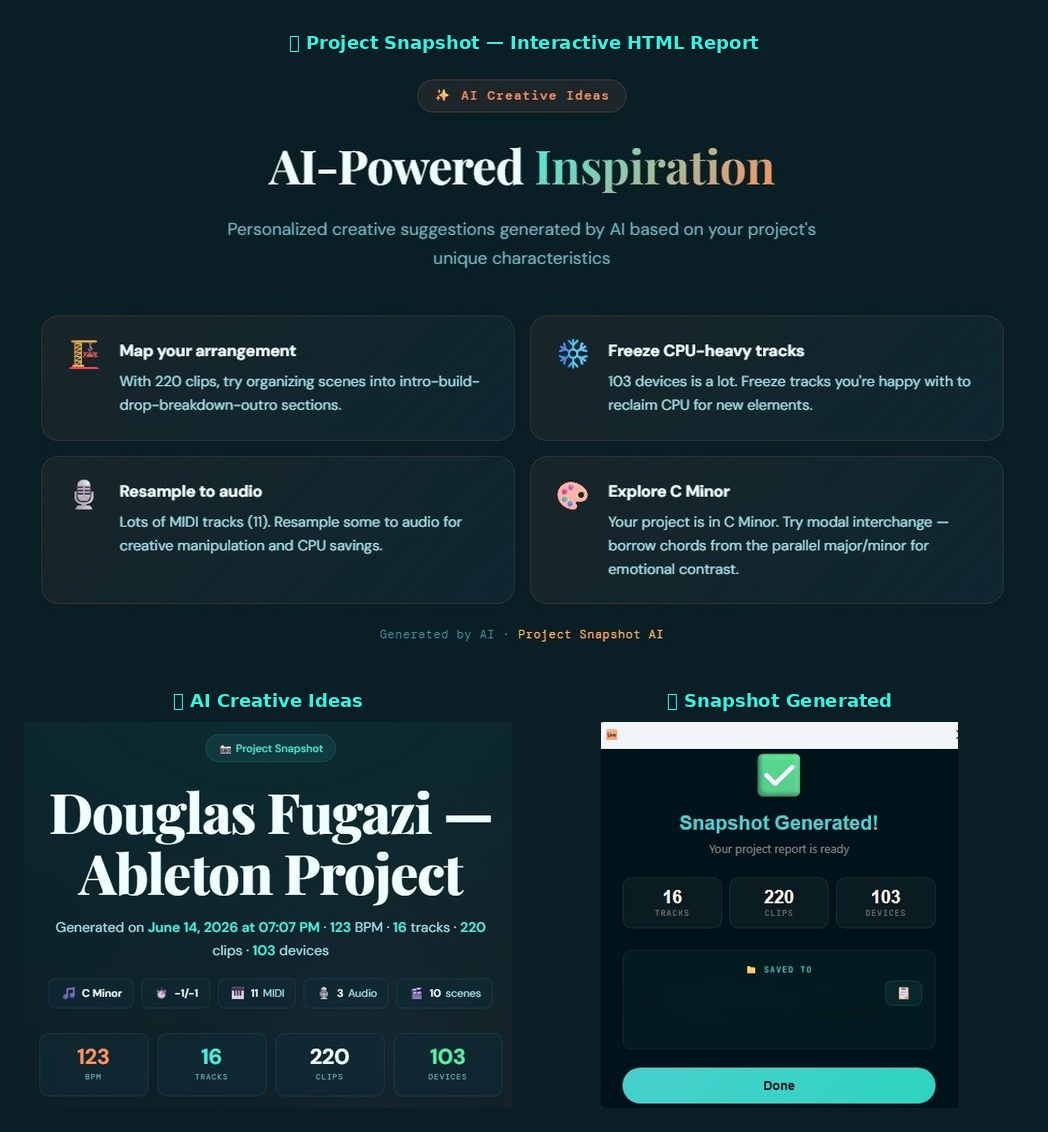
Project Snapshot is an Ableton Live extension that generates a beautiful, interactive HTML report of your entire Live Set — tracks, clips, devices, parameters, scenes, and more. Now with AI-powered creative suggestions to boost your inspiration. Perfect for retaking projects after weeks or months away.
✨ What It Does
When you open an old project and can't remember where you left off, Project Snapshot gives you:
- 🎯 Overview — Tempo, time signature, key/scale, track & clip counts
- 📊 Quick Stats — Visual dashboard of your project's composition
- 🎵 Tracks — Every track with type, state (arm/mute/solo), clip & device counts
- 🎹 Clips — Detailed clip info: name, type, warp mode, loop settings, MIDI note ranges
- 🔌 Devices & Parameters — Expandable accordions showing every device and its current parameter values
- 🎬 Scenes & Cue Points — All your arrangement markers at a glance
- ✨ AI Creative Ideas — Personalized creative suggestions generated by AI based on your project's unique characteristics (BPM, genre hint, devices, track structure)
- 💡 Suggested Next Steps — Smart tips based on your project's current state
- 📝 Notes — Editable notepad to write down where you left off (saved in browser)
The report is generated as a standalone HTML file with a dark, premium design — easy on the eyes.
🤖 AI Creative Ideas
Project Snapshot integrates AI-powered creative suggestions directly into the HTML report. When you generate a snapshot, the extension:
- Extracts the project data (BPM, tracks, devices, clips, scale, scenes)
- Sends a compact payload to a Cloudflare Worker proxy
- The Worker calls GLM 4.7 Flash via Cloudflare Workers AI
- Returns 5 personalized, creative suggestions for your project
Privacy: No personal data is sent. Only musical project characteristics (BPM, track types, device names, clip counts). No user registration required.
Fallback: If the AI service is unavailable, the extension generates local suggestions automatically — the feature always works.
Cost: Powered by Cloudflare Workers AI free tier (10,000 Neurons/day at no charge).
Changing the AI Model
The model is configured in worker/src/index.ts:
const MODEL = "@cf/zai-org/glm-4.7-flash";
Available models include:
@cf/zai-org/glm-4.7-flash— Fast, low cost (default)@cf/meta/llama-3.3-70b-instruct-fp8-fast— Best quality, higher cost@cf/qwen/qwen3-30b-a3b-fp8— Good balance@cf/google/gemma-3-12b-it— Solid alternative
See the Cloudflare Workers AI model catalog for the full list.
🚀 Quick Start
Prerequisites
- Ableton Live — Beta build with Extensions support
Installation (Easy Way — Download .ablx)
- Download the latest
project-snapshot.ablxfile from this repository - Open Ableton Live
- Go to Settings → Extensions
- Drag and drop the
.ablxfile onto the Extensions page - The extension is now installed! Right-click anywhere to generate a snapshot
The
.ablxfile is a pre-built, ready-to-install extension package. No Node.js or build tools required.
Installation (Developer Way — Build from Source)
Prerequisites: Node.js ≥ 24.14.1
-
Clone this repository:
git clone https://github.com/douglasfugazi/project-snapshot.git cd project-snapshot -
Install dependencies:
npm install -
Configure your Live path in
.env:EXTENSION_HOST_PATH=/path/to/Ableton Live Beta.appOn Windows:
EXTENSION_HOST_PATH=C:\ProgramData\Ableton\Live Beta\Program\Ableton Live Beta.exe -
Enable Developer Mode in Ableton Live:
- Open Live → Preferences → Extensions → Enable Developer Mode
-
Run the extension:
npm start
Usage
- With the extension loaded, open any Live Set in Ableton Live
- Right-click on almost any element (track, clip, scene, arrangement selection)
- Click 📸 Project Snapshot...
- Review the project summary in the modal dialog
- Click Generate and wait for the progress bar to complete
- Open the generated HTML file in your browser
- Explore the report including AI-powered creative suggestions
☁️ AI Worker Setup (Optional — for AI Creative Ideas)
The AI suggestions require a Cloudflare Worker proxy. Without it, the extension falls back to local suggestions.
Deploy the Worker
-
Create a free Cloudflare account
-
Get your Account ID from the Cloudflare dashboard
-
Create an API Token:
- Go to https://dash.cloudflare.com/profile/api-tokens
- Create Token → "Edit Cloudflare Workers" template
- Ensure it has
Workers AI: Editpermission
-
Deploy the Worker:
cd worker npm install # Set secrets (encrypted in Cloudflare — never in your code) export CLOUDFLARE_API_TOKEN="your-api-token" npx wrangler secret put CF_ACCOUNT_ID # Paste your Account ID npx wrangler secret put CF_API_TOKEN # Paste your API Token npm run deploy -
Update the Worker URL in
src/ai-suggestions.ts:const AI_WORKER_URL = "https://project-snapshot-ai.<your-subdomain>.workers.dev/suggestions"; -
Rebuild the
.ablx:npm run package
📁 Project Structure
project-snapshot/
├── manifest.json          # Extension metadata
├── package.json           # Dependencies & scripts
├── build.ts               # esbuild bundler config
├── tsconfig.json          # TypeScript configuration
├── .env                   # Live Beta path
├── .gitignore
├── project-snapshot.ablx  # Pre-built installable package
├── src/
│   ├── extension.ts       # Entry point — activate + commands + modal
│   ├── extractor.ts       # Data extraction from the Live Set
│   ├── ai-suggestions.ts  # AI suggestions fetcher + local fallback
│   ├── generator.ts       # HTML file generation
│   ├── template.ts        # HTML/CSS/JS template (Teal Green theme)
│   ├── modal.ts           # Modal dialog HTML
│   └── types.ts           # TypeScript interfaces & utilities
├── worker/                # Cloudflare Worker (AI proxy)
│   ├── src/index.ts       # Worker entry point — prompt builder + AI call
│   ├── package.json       # Worker dependencies
│   ├── wrangler.toml      # Cloudflare Worker config
│   └── README.md          # Worker setup instructions
└── vendor/
    ├── ableton-extensions-sdk-1.0.0-beta.0.tgz
    └── ableton-extensions-cli-1.0.0-beta.0.tgz
🎨 Design
The generated HTML report features a modern dark design:
- Palette: Deep teal backgrounds (
#0a1e26,#13343b) with bright teal accents (#3ef0e0) - Highlights: Warm flame (
#ff8f5c) for AI section, purple for insights - Fonts: DM Sans (body), DM Mono (code), Playfair Display (titles)
- Effects: Glassmorphism nav, gradient cards, animated progress bars, accordion devices
- Features: Sticky navigation, scroll-to-top/bottom, share button, localStorage notes, AI creative cards with hover glow
🛠️ Available Context Menu Scopes
The extension is accessible from these right-click locations:
| Scope | Where |
|---|---|
ClipSlot | Session View clip slots |
AudioTrack | Audio tracks |
MidiTrack | MIDI tracks |
AudioClip | Audio clips |
MidiClip | MIDI clips |
Scene | Scene launcher |
AudioTrack.ArrangementSelection | Arrangement View (audio) |
MidiTrack.ArrangementSelection | Arrangement View (MIDI) |
🧠 Smart Suggestions
The extension analyzes your project and provides two types of suggestions:
AI Creative Ideas (powered by GLM 4.7 Flash)
- Personalized creative direction based on your project's genre and structure
- Arrangement, sound design, mixing, and workflow tips
- Generated in real-time from your project data
Local Insights (built-in engine)
- 🧹 Empty tracks that could be removed
- 🏷️ Unnamed clips that need renaming
- 🔴 Armed tracks ready for recording
- 🔇 Muted tracks to check before mixing
- 🎧 Soloed tracks to unsolo
- ⏱️ Default tempo (120 BPM) suggestion
- 📍 Missing cue points
- ⚙️ High device count → freeze suggestion
📋 Scripts
| Command | Description |
|---|---|
npm start | Build and run the extension in Live |
npm run build | Type-check + production build (minified, no sourcemaps) |
npm run package | Build + package into .ablx installable file |
Building a new .ablx
If you made changes and want to generate a new installable:
npm run package
npx extensions-cli package -o project-snapshot.ablx
The .ablx file can be shared and installed by dragging it into Live's Extensions page.
⚠️ Limitations
- Extensions run in a Node.js process — not real-time
- No access to VST plugin names (only native Live devices and basic info)
- No waveform visualization
- No automation/envelope data
- Requires Ableton Live Beta with Extensions support
- The SDK is in beta — APIs may change
- AI suggestions require internet connection (falls back to local if offline)
- AI suggestions are limited by the Workers AI free tier (10,000 Neurons/day)
👤 Author
Douglas Fugazi
Senior QA Automation Engineer & Electronic Music Producer
🌐 douglasfugazi.co
📄 License
This project is licensed under the MIT License — see the LICENSE file for details.
Built with the Ableton Extensions SDK (beta).
AI suggestions powered by Cloudflare Workers AI.
📸 Project Snapshot — Because your music projects deserve a map.
Rate this extension
One rating per account; you can change it any time.
Comments
No comments yet.