Strudel Live
v1.0.0Ableton Live extension that renders Strudel live-coding patterns into audio clips, with the code embedded in each clip's WAV
 Val Enfys—No ratings yet
Unverified listing. This repo is new or has little community activity and the developer has not claimed it. Extensions run code inside Live — read the source, check the author, and only install things you trust.
strudel-live
An Ableton Live extension built with @ableton-extensions/sdk that renders
Strudel code into audio clips. The code is stored inside
each clip's WAV file (in a custom strd RIFF chunk), so it is the clip's
source of truth and travels with the Live set.
Get Started
Learn about building extensions: https://ableton.github.io/extensions-sdk/
Setup
- The path to Ableton Live's Extension Host module is stored in
.envasEXTENSION_HOST_PATH. The generator filled this in for you; edit it if your install moves. - Turn on Developer Mode in Live's settings, or
npm startwill fail with "Failed to connect to Live within 10s".
Usage
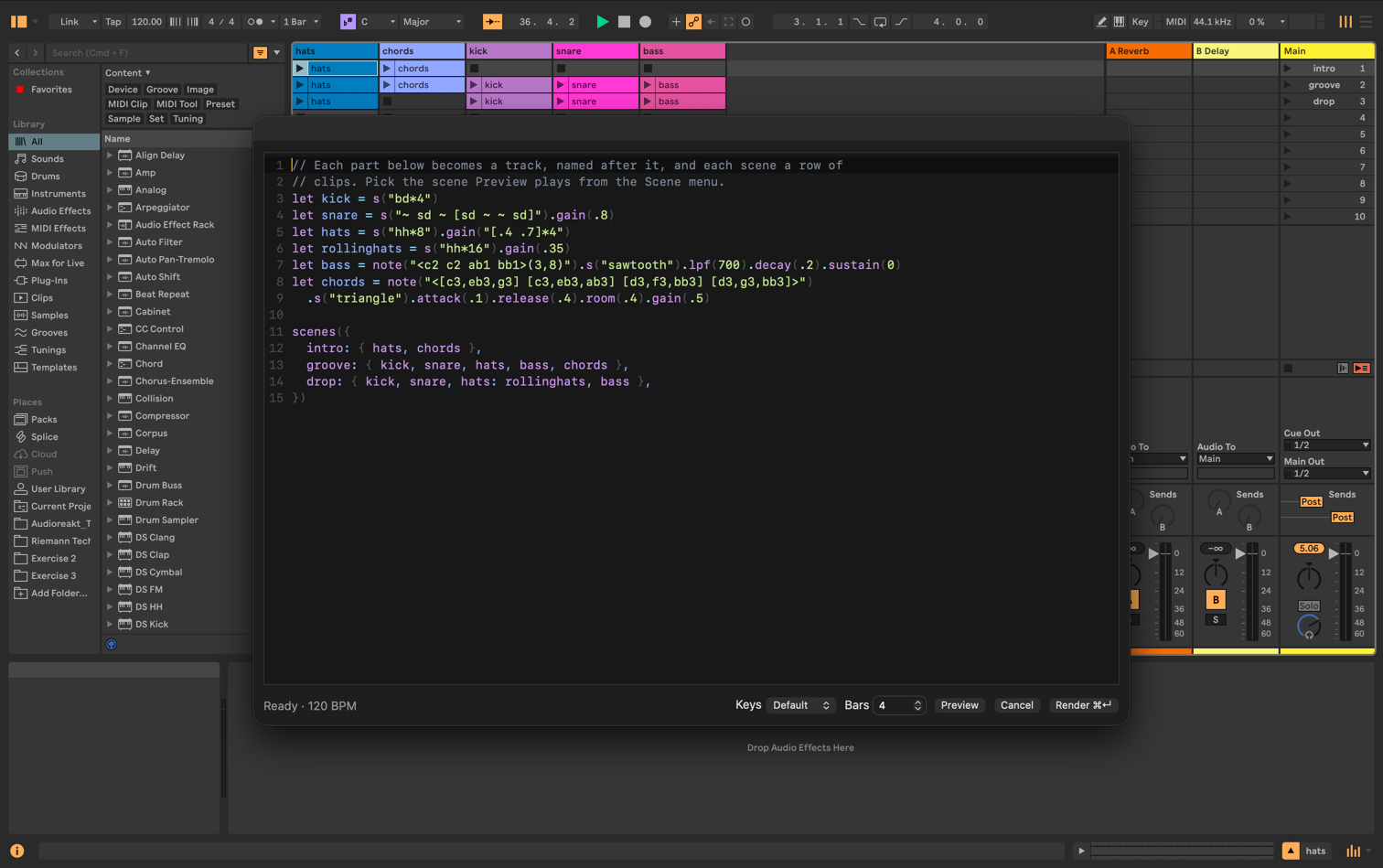
- Right-click an empty clip slot on an audio track → New Strudel clip… The editor starts with example code laid out as three scenes (see Scenes), which adds two scenes below the slot and a track per part.
- Right-click a Strudel audio clip → Edit Strudel… to change its code and re-render it. The clip is replaced in place, keeping its color (a playing Session clip stops).
Stems
Each labelled block in the code renders to its own clip, on a track named after the label, so the parts can be mixed and processed separately in Live:
kick: s("bd*4");
bass: note("<c2 ab1>(3,8)").s("sawtooth");
- Each stem's clip is named after its label, on every render. A clip from code without labels keeps the name you give it.
- The stems sit side by side: in the same Session row, or at the same Arrangement position. Editing any of them re-renders all of them in place.
- A new label goes on a free track with that name, or a new track. A label removed from the code has its clip deleted (the track stays).
- Muted blocks (
_kick:) render silent clips. Anonymous$:blocks become "Strudel 1", "Strudel 2"… in order, so name blocks that should keep their track. - Code without labels renders a single clip, as before.
Scenes
In Session View, one piece of code can fill several scenes. Define each part once, then list which parts play in each scene:
let kick = s("bd*4");
let hat = s("hh*8").gain(0.6);
let rollinghat = s("hh*16").gain(0.4);
let bass = note("<c2 ab1>(3,8)").s("sawtooth");

scenes({
  intro: { hat },
  verse: { kick, hat, bass },
  drop: { kick, hat: rollinghat, bass }, // rollinghat goes on the hat track
});
- Each scene is a row, named after it, and each part is a track, named after
its key (so
{ kick }putskickon akicktrack). Clips are named after the variable they were written with, sohat: rollinghatputs arollinghatclip on thehattrack. A part left out of a scene has no clip there, so launching that scene stops its track. - Rows match scenes by position: renaming a scene in code renames the Live scene, and reordering scenes moves their clips. Scenes added to the code are inserted below the group, moving the rest of the set down. A scene removed from the code has its clips deleted, but the Live scene stays.
- Every scene is rendered as its own loop of the editor's Bars length.
- Pick which scene Preview plays with the Scene menu, shown once the code has been evaluated.
- For now, code uses either labels or
scenes(), not both, and scenes only work in Session View.
How it works
src/extension.tsregisters the context menu actions and places rendered clips in Live.src/server.tsserves the editor UI on127.0.0.1and receives rendered audio from it.ui/is the editor dialog. It runs Strudel and renders patterns offline with anOfflineAudioContextat the song tempo (one cycle = one 4/4 bar), one render per labelled block.src/wav.tswrites 32-bit float WAVs with thestrdchunk and reads it back.
Scripts
npm start                  # build + run in Live's Extension Host
npm run build              # production build of the extension and UI
npm run build:dev          # dev build (sourcemaps, not minified)
npm run package            # build for production + create a .ablx archive
npm test                   # unit tests (Vitest)
npm run check              # typecheck + lint + format check + unit tests
npm run test:e2e           # build the UI + run the editor's browser tests (Playwright)
The browser tests drive the editor dialog in headless Chromium against the
real editor server, standing in for Live's dialog bridge. Install the browser
once with npx playwright install chromium. Anything that needs Live itself
still has to be checked by hand with npm start.
License
This project is licensed under AGPL-3.0-or-later, the same license as Strudel, which it bundles.
The Ableton Extensions SDK and CLI are proprietary and are not included in
this repository. They are installed from vendor/, which you populate with
your own copy of the SDK.
Rate this extension
One rating per account; you can change it any time.
Comments
No comments yet.