TTS Fish Audio Live Extension
This Ableton Live extension that turns typed text or a dropped .txt file into generated audio using Fish Audio(https://fish.audio/).
 Han Zhang—No ratings yet
Unverified listing. This repo is new or has little community activity and the developer has not claimed it. Extensions run code inside Live — read the source, check the author, and only install things you trust.
Text-To-Speech Agent with Fish Audio
This Ableton Live extension that turns typed text or a dropped .txt file into generated audio using Fish Audio(https://fish.audio/).
What You Need
- Ableton Live with extension support.
- The
audio-synthsis-agent-live-extension.ablxfile. - A Fish Audio API key.
- A Fish Audio
reference_idfor the voice ID you want to use.
Install the .ablx File
- Open Ableton Live 12 Beta.
- Find the
.ablxfile in Finder. - Open Settings in ableton and go to Extensions. Disable the Developer Mode at the buttom, then drag the
.ablxfile into the Ableton Live window. - Restart Ableton Live if Ableton asks you to.
Open the Extension
-
Go to Session View in Ableton Live.
-
Right-click an audio track or an empty clip slot.
-
Choose the Text to Audio Agent action:
- On an audio track:
Open audio-synthsis-agent-live-extension - On a clip slot:
Generate audio here
- On an audio track:
Generate Audio
-
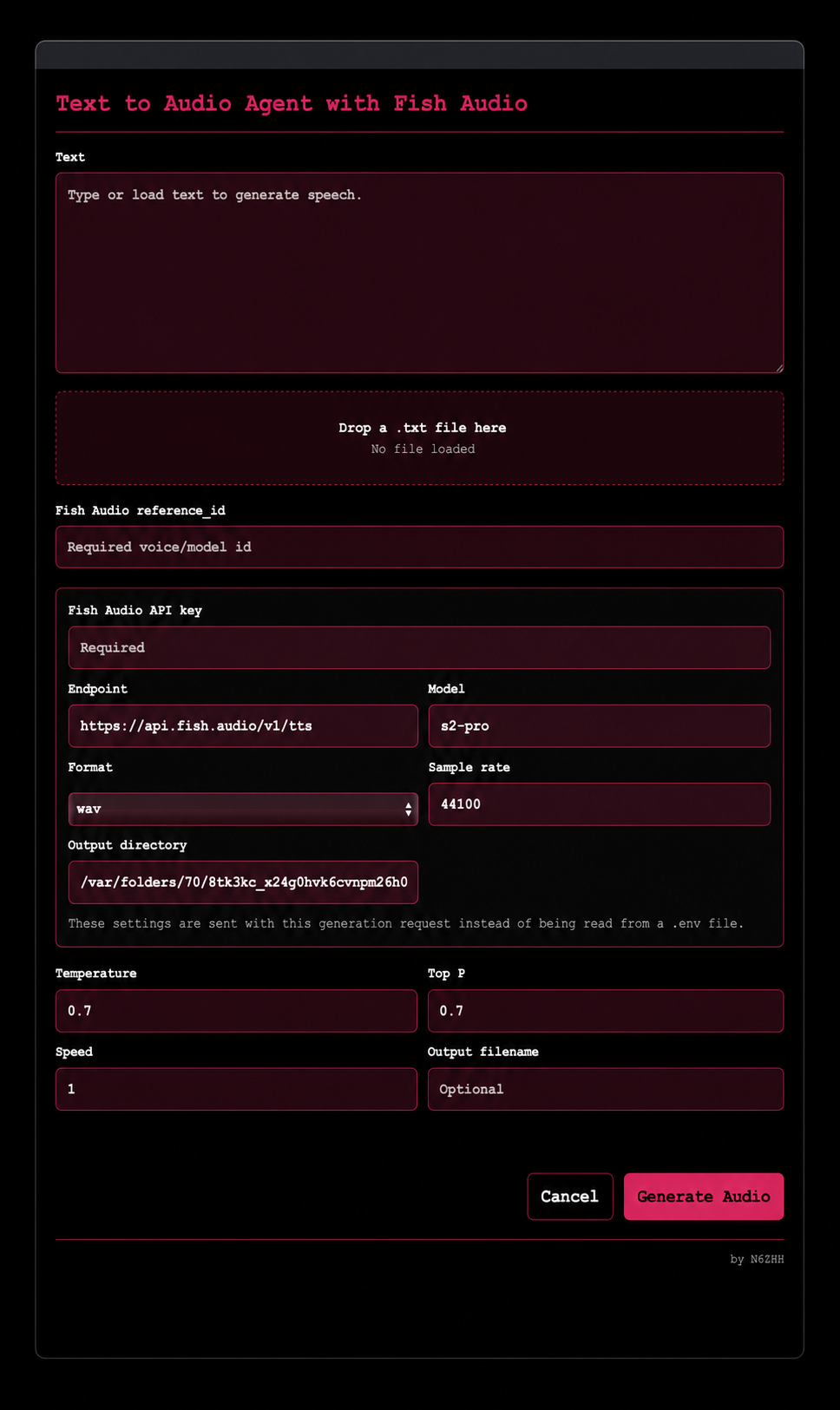
Enter text in the
Textbox, or drag a.txtfile ontoDrop a .txt file here. -
Enter your Fish Audio
reference_id. -
Enter your Fish Audio API key.
-
Leave the default settings unless you need to change them:
Endpoint: Fish Audio API endpoint.Model: Fish Audio model.Format: output file format, usuallywav.Sample rate: usually44100.Output directory: temporary folder for generated files.
-
Adjust optional voice controls if needed:
TemperatureTop PSpeedOutput filename
-
Click
Generate Audio.
Where the Clip Appears
If you opened the extension from an audio track:
- The generated clip goes into the first empty Session View clip slot on that track.
- If every slot is full, the extension replaces the oldest clip previously generated by Text to Audio Agent.
- It does not replace unrelated user clips if no older Text to Audio Agent clip exists.
If you opened the extension from a clip slot:
- The generated clip goes into that exact slot.
- If the slot already has a clip, that clip is replaced.
Loading .txt Files
The extension uses drag and drop only.
- Drag a
.txtfile from Finder. - Drop it onto the dialog area labeled
Drop a .txt file here. - The text will appear in the
Textbox.
Troubleshooting
If generation fails:
- Check that your Fish Audio API key is correct.
- Check that your
reference_idis correct. - Check that your internet connection is working.
- Try a shorter text prompt.
- Make sure the selected Ableton target is an audio track or clip slot.
If Ableton says the Extension Host stopped running, check the extension log:
text-to-audio-agent.log
The log is written in Ableton's extension storage folder when available.
Rate this extension
One rating per account; you can change it any time.
Comments
No comments yet.